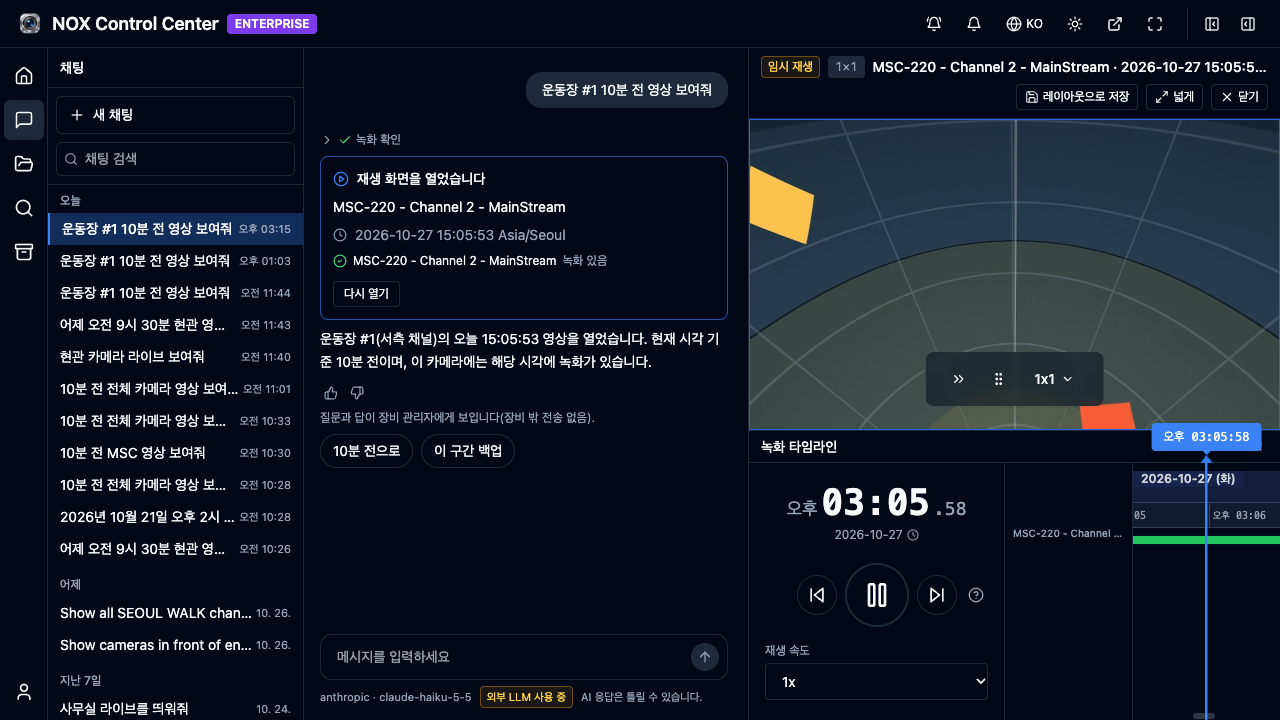
NOX NVR에 AI 채팅 기능이 추가됐다. 카메라 이름과 시각을 문장으로 입력하면 해당 녹화를 바로 재생한다. 메뉴를 열고, 카메라를 찾고, 시각을 맞추는 과정이 질문 한 줄로 줄어든다.
사용 방법
왼쪽 메뉴에서 채팅을 열고 질문을 입력한 뒤 Enter를 누른다. 예를 들면 이렇게 묻는다.
- 어제 오전 9시 30분 현관 영상 보여줘
- 지난 금요일 오후 3시 주차장 영상
카메라는 이름으로 찾는다. 질문에 '현관'이라고 쓰면 이름에 '현관'이 들어간 카메라를 연다. 그래서 카메라 이름은 현장에서 쓰는 말로 지어 두는 것이 좋다. 열린 영상은 오른쪽 결과 영역에서 재생된다. 채팅은 영상을 찾아 여는 데까지만 하며, 장비 설정은 바꾸지 않는다.
채팅 켜기: 관리자 설정
관리자는 Settings > 서비스 > 채팅에서 채팅을 켠다. 공급자는 Anthropic(Claude API)으로 고르고, 고객 본인의 API 키를 입력한 뒤 모델 목록을 불러와 모델을 고른다. 키는 암호화해 저장하며, 저장한 뒤에는 다시 보이지 않는다.
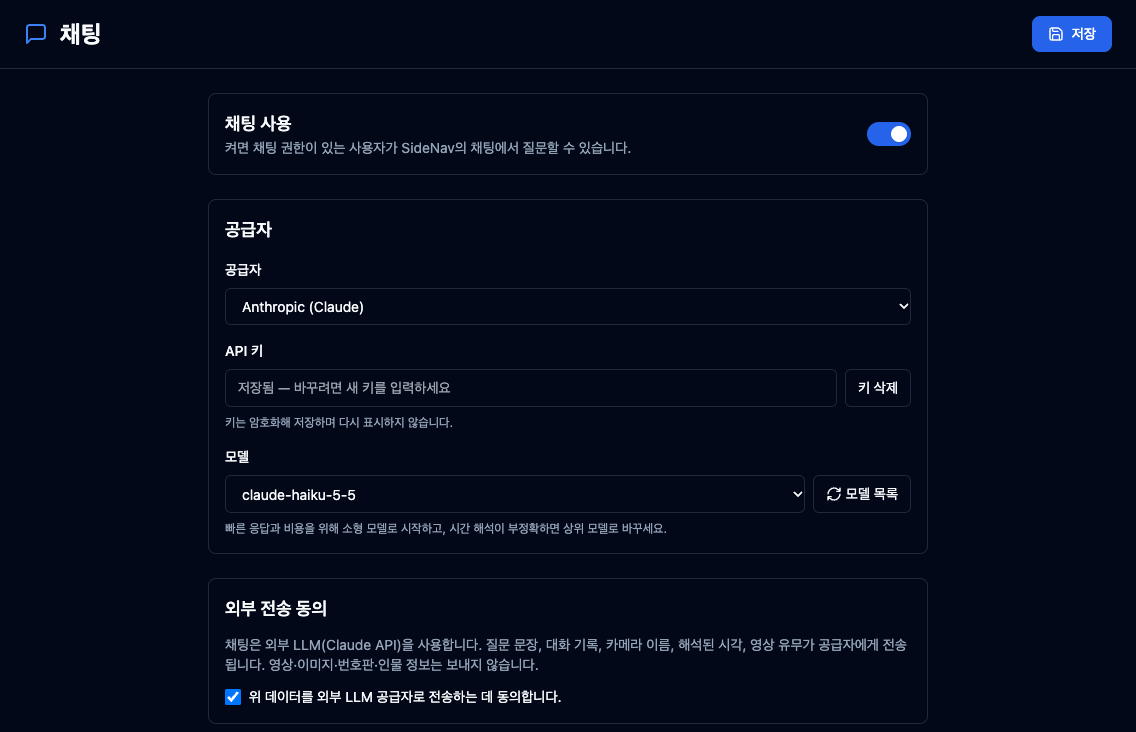
외부 전송 동의에 체크하지 않으면 채팅은 켜지지 않는다. 동의 항목에는 질문 문장, 대화 기록, 카메라 이름, 해석된 시각, 영상 유무가 공급자에게 전송된다고 적혀 있고, 영상·이미지·번호판·인물 정보는 보내지 않는다. 다만 질문에 직접 쓴 번호판이나 인물 묘사는 질문 문장에 들어가므로 전송된다.
개발 뒷이야기
채팅을 만들면서 가장 재미있게 배운 것은 '해석했다'와 '열었다'가 같은 말이 아니라는 점이었다. 처음에는 카메라와 시각을 찾기만 해도 성공으로 보았다. 그 때문에 녹화가 없는 질문의 답변 본문과 다음 동작 버튼이 서로 어긋났다. 지금은 실제로 재생 화면이 열렸는지를 기준으로 판단한다. 답변 문장이 '열었습니다'라고 말해도, 확인은 결과 카드의 카메라별 재생 결과로 하면 된다.
같은 장비는 MCP 서버로도 연결할 수 있다. Claude Code나 Claude Desktop에 등록하면 AI 에이전트가 장비를 읽기 전용으로 조회하며, 장비 상태를 바꾸는 도구는 없다. 채팅과 마찬가지로 ENTERPRISE 에디션 기능이고, NIS 보안 모드가 켜진 장비에서는 쓸 수 없다.
처음 실제 장비에 Claude Code를 붙여 시험하던 날도 기억에 남는다. 녹화가 빠진 곳이 있는지 묻자 녹화 구간 도구와 재생 링크 도구가 서로 다른 말을 했다. Claude Code는 '녹화가 전부 비었다'고 옮기지 않고, 두 결과가 서로 맞지 않는다고 먼저 짚었다. 원인은 시간대 계산 한 줄이었고, 출시 전에 고쳤다. 자세한 과정은 MCP 서버 개발기에 적었다.
현재 지원 범위
- 에디션: ENTERPRISE 에디션에서 쓸 수 있다.
- AI 공급자: 현재는 Anthropic(Claude API)만 지원한다. 고객이 자신의 API 키를 넣어 쓴다. 다른 LLM도 향후 지원할 예정이다.
- 외부 전송: 질문 문장과 카메라 이름 등이 공급자로 전송된다. 관리자가 동의해야 켜진다.
- 보안 모드: NIS 보안 모드에서는 쓸 수 없다.
설치 파트너 상담 신청: yiyol.com/contact
관련 글
- NOX MCP 서버 개발기 — 읽기 전용으로 시작한 이유와, Claude Code가 먼저 찾아낸 버그 — 같은 장비를 AI 에이전트에 연결하는 또 다른 경로
- Agentic AI NVR이란? AI NVR과의 결정적 차이 — 감지에서 판단과 실행까지 이어지는 구조
- WebHook으로 구현하는 Agentic AI: 주차장 자동화 완전 구축 가이드 — 에이전트와 외부 시스템을 잇는 또 다른 방법
NOX NVR now includes AI Chat. Type a camera name and a time in a sentence, and the matching recording plays right away. Opening a menu, finding the camera, and setting the time collapse into a single question.
How to Use
Open Chat from the left menu, type a question, and press Enter. For example:
- Show me yesterday's 9:30 AM entrance footage
- Parking lot footage, last Friday at 3 PM
Cameras are found by name. A question that says "entrance" opens the cameras whose names include "entrance," so it helps to name cameras with the words your site uses. Opened video plays in the result area on the right. Chat only finds and opens recordings; it does not change device settings.
Turning Chat On: Administrator Settings
Administrators turn chat on at Settings > Services > Chat. Choose Anthropic (Claude API) as the provider, enter your own API key, load the model list, and pick a model. Keys are stored encrypted and are not shown again after saving.
Chat stays off until the external transmission consent box is checked. The consent text says that question text, conversation history, camera names, the interpreted time, and whether video exists are sent to the provider, while video, images, license plates, and personal information are not. License plates or appearance descriptions typed into a question are part of the question text, so they are sent.
Notes from Development
The most useful lesson from building chat was that understanding a question and actually opening the video are two different things. At first, a question counted as a success as soon as the camera and time were resolved, so for a query with no recording, the answer text and the next-action button did not match. Now the outcome depends on whether the playback screen actually opened. Even if the answer says the video was opened, check the per-camera playback result on the result card.
The same device can also connect as an MCP server. Once registered in Claude Code or Claude Desktop, an AI agent can query the device read-only, and no tool changes device state. Like chat, MCP is an ENTERPRISE edition feature and cannot be used on devices with NIS security mode enabled.
We also remember the first day we connected Claude Code to a real device. When we asked about gaps in recordings, the recording-coverage tool and the playback-link tool gave conflicting answers. Claude Code did not repeat that all recordings were empty. Instead, it pointed out that the two results contradicted each other. The cause was a single timezone conversion in one query, and it was fixed before release. The full story is in the MCP server development log.
Current Support
- Edition: Available in the ENTERPRISE edition.
- AI provider: Currently Anthropic (Claude API) only. Customers use their own API key. Support for other LLMs is planned.
- External transmission: Question text and camera names are sent to the provider. Chat can be turned on only after an administrator consents.
- Security mode: Not available when NIS security mode is enabled.
Apply for installation partner consultation: yiyol.com/contact
Related Posts
- Building the NOX MCP Server — Why We Started Read-Only, and the Bug Claude Code Found First — Another route for AI agents to query the same device
- What Is an Agentic AI NVR? The Decisive Difference from an AI NVR — A structure that extends from detection to judgment and action
- Agentic AI with WebHooks: A Complete Guide to Parking Lot Automation — Another way to connect agents with external systems