헤드리스 NVR은 본체의 로컬 모니터 출력을 제거하고, 라이브 영상의 디코딩과 화면 구성을 모바일·PC 클라이언트로 이전한 NVR 구조다. 서버는 녹화와 스트림 중계, AI 분석에만 자원을 사용한다.
현재 국내에 설치된 대부분의 NVR은 반대 구성으로 운영된다. 본체에 모니터를 연결하고 16분할 격자를 상시 출력한다. 교대 인력이 화면을 감시하는 관제센터에서는 타당한 구성이다. 그러나 공장, 물류창고, 학교, 상가, 중소 사업장에는 상주 감시 인력이 없다. 화면은 상시 출력되지만 실제 열람은 사고 발생 이후 해당 구간을 재생할 때 이뤄진다.
NVR의 사양을 결정하는 주 요인은 녹화가 아니라 화면 출력이다. 이 글은 로컬 출력이 소비하는 자원을 단계별로 분해하고, 해당 부하를 클라이언트로 이전했을 때의 사양·원가 변화와 도입 시 검토 사항을 정리한다.
로컬 격자 출력은 DVR에서 이어진 구조다
아날로그 DVR에서 로컬 출력은 본체의 핵심 기능이었다. 동축으로 수신한 카메라 신호를 화면에 표시하는 것이 장비의 목적이었고, 조작과 확인도 전면 패널에서 수행됐다.
IP 전환 이후 영상은 네트워크상 어디서든 조회할 수 있게 됐으나, 로컬 모니터에 격자를 출력하는 구성은 그대로 유지됐다. 구매 규격서에 HDMI 출력 개수와 분할 표시 수가 항목으로 남아 있는 것이 대표적이다. 현장의 운영 요구사항이 아니라 이전 규격을 승계한 결과다.
로컬 출력이 소비하는 자원
녹화 경로와 출력 경로는 부하 구조가 다르다. 녹화는 카메라가 전송한 H.264/H.265 스트림을 디코딩 없이 디스크에 기록한다. 컨테이너 저장과 인덱스 생성이 전부이며, 병목은 연산이 아니라 디스크 대역폭이다. 32채널 녹화는 저사양 보드에서도 동작한다.
부하는 화면 출력 단계에서 발생한다. 라이브 격자 한 장을 구성하려면 채널마다 다음 과정을 수행한다.
이 과정을 초당 30회, 채널 수만큼 병렬로 수행한다. 4K 16채널을 메인스트림 그대로 디코딩하는 것은 일반적인 내장 GPU의 처리 범위를 벗어나므로, 실제 제품은 서브스트림으로 격자를 구성한다. 그럼에도 하드웨어 디코더 세션 수와 메모리 대역폭, 프레임버퍼는 동일하게 요구된다.
재생 구간의 디코딩 부하
재생은 라이브보다 부하가 크다. 4분할 재생은 4채널 동시 디코딩이며, 타임라인을 이동할 때마다 키프레임을 탐색해 디코딩을 재시작한다. 배속 재생은 배속만큼 프레임을 추가로 처리한다. 사용자가 타임라인을 조작하는 동안 디코더는 최대 부하로 동작한다.
이 요구사항은 부품 선택으로 직결된다. 내장 GPU 등급 상향, 메모리 대역폭 확보, 발열 증가에 따른 방열 설계와 전원 용량 상향이 함께 발생한다. BOM 상에서 단일 항목이 아니라 복수 항목이 동시에 올라간다.
헤드리스 구조: 디코딩을 클라이언트로 이전
영상을 조회하는 단말에는 이미 하드웨어 디코더가 탑재돼 있다. 스마트폰은 H.265 하드웨어 디코더를 기본 제공하며, 업무용 PC의 내장 그래픽도 동일하다. 조회하지 않는 시간 동안 이 자원은 사용되지 않는다.
디코딩 위치를 이전하면 부하 발생 패턴이 바뀐다. 로컬 출력은 조회 여부와 무관하게 24시간 동일한 연산을 수행한다. 클라이언트 처리 방식에서는 조회 중인 사용자 수와 채널 수만큼만 부하가 발생하며, 조회가 없는 구간에서는 발생하지 않는다. 서버는 수신한 스트림을 그대로 전달하는 중계 역할을 수행하므로 채널당 비용이 낮다.
서버 트랜스코딩은 예외다. 저사양 단말을 위해 서버에서 해상도를 낮춰 재인코딩하는 구조라면 디코딩 부하에 인코딩 부하가 추가돼 사양이 오히려 상승한다. 카메라가 생성하는 서브스트림을 활용하고, 타일 크기에 따라 메인스트림과 서브스트림을 선택해 전송하는 방식이 적합하다.
자원 소비 비교: 로컬 출력 유지 vs 헤드리스
| 구분 | 로컬 출력을 유지할 때 | 헤드리스일 때 |
|---|---|---|
| 라이브 디코딩 | 전 채널 상시 수행 | 조회 중인 사용자·채널 수만큼만 발생 |
| 재생 디코딩 | 본체에서 수행 | 클라이언트에서 수행 |
| GPU 용도 | 디코딩·스케일링·합성 | AI 분석에 할당 |
| 메모리 | 디코드 버퍼 + 프레임버퍼 | 스트림 버퍼 중심 |
| 방열·전원 설계 | 상향 | 하향 |
핵심은 GPU 용도 항목이다. 현재 NVR에 GPU를 탑재하는 목적은 화면 출력이 아니라 AI 분석이다. 동일한 GPU를 격자 합성에 사용할 것인지 객체 검출에 사용할 것인지에 따라 제품의 성격이 달라진다. 로컬 출력을 제거하면 동일 하드웨어에서 AI 분석 채널을 늘리거나, 동일한 분석 성능을 더 낮은 사양의 보드에서 확보할 수 있다.
원가 구조와 국산 NVR의 경쟁력
국산 NVR이 중국산 제품과의 경쟁에서 불리한 지점은 성능이 아니라 가격이다. 중국 제조사는 영상 처리 전용 SoC를 자체 물량으로 확보해 BOM을 낮춘다. 국산 제품은 범용 x86 또는 ARM 보드를 기반으로 하는 사례가 많아 동일 채널 수 기준 원가 경쟁이 어렵다.
보드 사양의 상당 부분이 로컬 출력 요구사항에서 비롯된 것이라면, 이는 절감 가능한 원가에 해당한다. 기능을 축소하는 것이 아니라 사용하지 않는 기능을 제거하는 것이다. 운영 중 아무도 조회하지 않는 격자 화면을 위해 한 등급 상위 보드를 투입하고 있었다면, 등급 하향에 따른 기능 손실은 발생하지 않는다.
국산 장비에 대한 수요는 이미 형성돼 있다. 2024년 IP카메라 영상 유출 사건 이후 공공기관과 민간 모두 장비 출처를 구매 기준에 포함하기 시작했다. 관건은 동일 가격대 진입이며, 사용하지 않는 출력단 제거는 즉시 적용 가능한 원가 절감 수단이다.
헤드리스 NVR 도입 시 검토 사항 5가지
1. 설치 및 장애 시 상태 확인 수단
화면이 없으면 부팅 완료 여부와 할당 IP를 확인할 방법이 필요하다. 전면 LCD 또는 상태 LED, 초기 설정용 AP, 동일 네트워크 자동 검색 중 최소 한 가지는 제공해야 한다. 미제공 시 설치 시간이 증가해 절감한 원가가 인건비로 상쇄된다.
2. 네트워크 장애 시 접근 경로
로컬 출력은 네트워크 상태와 무관하게 동작한다. 헤드리스 구조에서는 스위치 장애 시 조회가 불가능하므로, 본체에 직접 연결해 접속할 수 있는 경로를 확보해야 한다.
3. 조달 규격의 출력 단자 요구사항
공공 조달 규격에 HDMI 출력이 명시된 경우, 출력단이 없는 모델은 입찰 참여가 제한된다. 기술적 문제가 아니라 규격 문제다. 현실적인 방안은 출력을 옵션 사양으로 두고, 소프트웨어가 로컬 출력을 전제로 동작하지 않도록 설계하는 것이다. 이 경우 출력 유무는 하드웨어 라인업 선택 사항이 된다.
4. 클라이언트 측 스트림 설계
모바일에서 16분할을 메인스트림으로 조회하면 단말 부하와 배터리 소모가 급증한다. 타일 크기에 따른 스트림 선택, 화면에서 벗어난 타일의 구독 해제가 클라이언트에 구현돼야 한다. 이 부분이 미흡하면 헤드리스 구조 자체가 성능 저하로 평가된다.
5. 네트워크 대역폭
로컬 출력은 네트워크를 사용하지 않지만, 헤드리스 구조는 접속 사용자 수만큼 대역폭을 사용한다. 사내망에서는 영향이 크지 않으나 원격 접속 비중이 높은 현장은 설계 단계에서 반영해야 한다.
NOX가 헤드리스 구조를 구현하는 방법
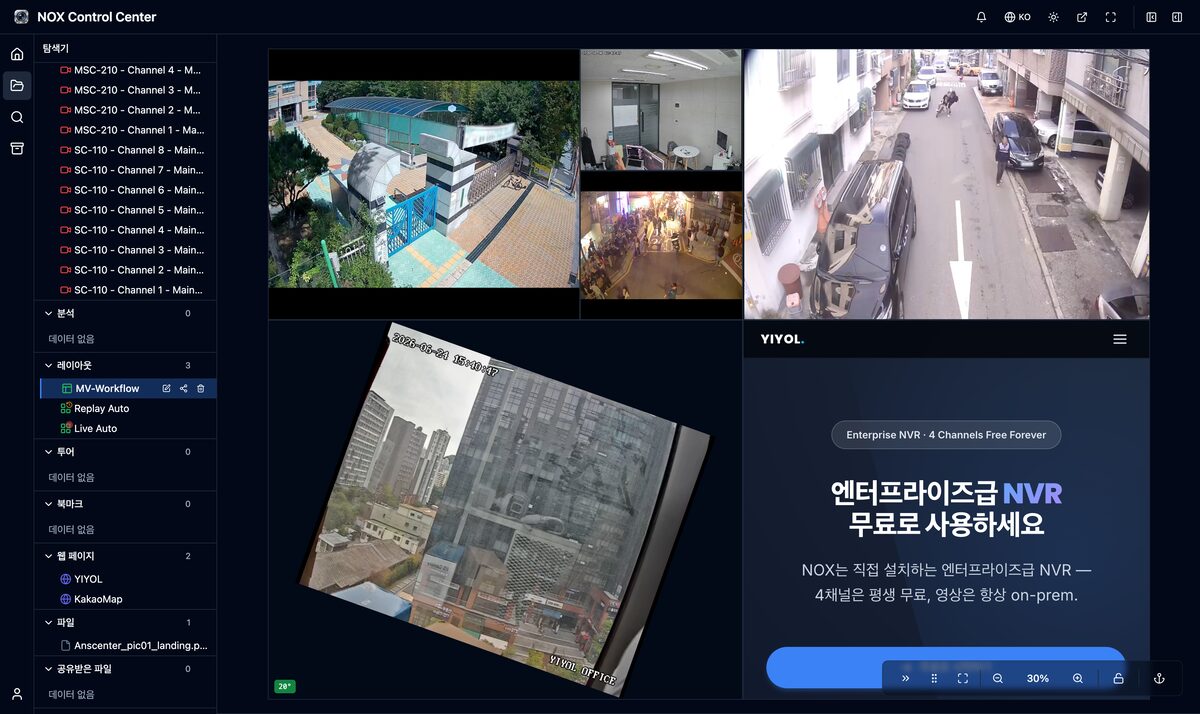
NOX는 전용 클라이언트를 설치하지 않고 웹 브라우저에서 전 기능을 사용한다. 화면 구성은 클라이언트에서 수행하며, 타일 크기와 배치를 자유롭게 구성하고 카메라 외에 웹 페이지와 파일도 동일 화면에 배치한다. 이 레이아웃은 서버가 합성해 전송하는 영상이 아니라 브라우저가 렌더링한 화면이다.
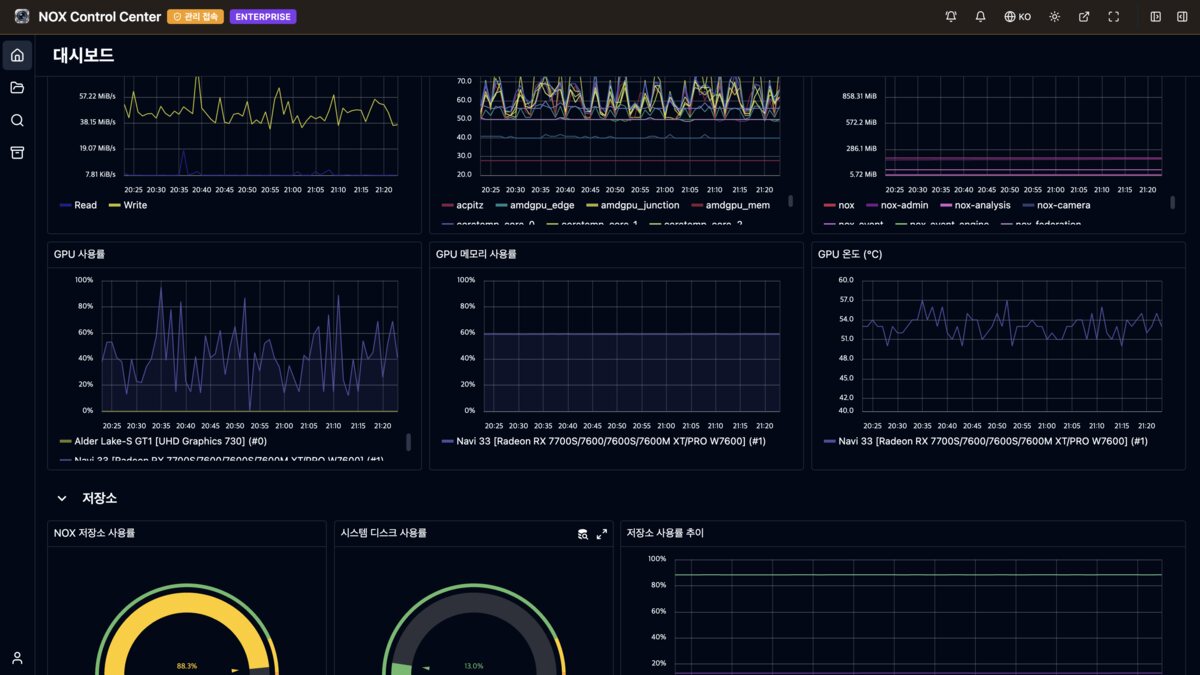
서버는 녹화와 중계, AI 분석에 자원을 사용한다. 대시보드에서 GPU 사용률과 메모리, 온도를 조회해 자원 사용 현황을 확인한다.
NOX-A08 시리즈는 4K HDMI 2개와 VGA 1개를 제공한다. 관제 화면이 필요한 현장을 위한 구성이며, 소프트웨어는 로컬 출력을 전제로 동작하지 않는다. 출력을 사용하지 않는 현장에서는 해당 자원이 AI 분석에 할당된다.
자주 나오는 반론: 화면이 없으면 녹화 상태를 확인할 수 없다
로컬 화면이 꺼져 있으면 녹화 여부를 확인할 수 없다는 지적이 있다. 그러나 화면 출력은 녹화 상태를 보장하지 않는다. 채널별 기록 상태와 디스크 잔량, 카메라 연결 끊김 알림으로 확인하는 것이 정확하며, 이 정보는 화면 없이 모바일 알림으로 전달된다. 상태 확인은 알림으로, 영상 열람은 필요 시점에 클라이언트로 수행하는 것이 운영 관점에서 효율적이다.
결론: 사용하지 않는 출력단이 원가를 결정한다
헤드리스 NVR은 기능을 축소한 제품이 아니라 연산 위치를 재배치한 구조다. 로컬 출력에 할당되던 디코딩·스케일링·합성 부하를 조회 시점의 클라이언트로 이전하면 GPU와 메모리, 방열, 전원 사양이 함께 내려간다. 확보한 자원은 AI 분석 채널로 전환하거나 보드 등급 하향을 통해 원가에 반영할 수 있다.
관제센터에는 로컬 출력이 필요하다. 그 외 대부분의 현장에는 필요하지 않다. 기본 구성을 어느 쪽에 맞출 것인가가 국산 NVR의 가격 경쟁력을 좌우한다.
👉 NOX 제품 페이지에서 실제 운영 화면 확인 — 브라우저 기반 라이브 레이아웃과 시스템 대시보드
NOX NVR 파트너십 및 POC 프로그램 문의: yiyol.com/contact
관련 글
- NVR 하드웨어 제조사가 소프트웨어 파트너를 선택해야 하는 이유 — 하드웨어 원가를 절감해도 소프트웨어 없이는 제품이 성립하지 않는 이유
- Agentic AI NVR이란? AI NVR과의 결정적 차이 — 화면 출력에서 회수한 GPU 자원을 분석과 자동화에 적용하는 방향
- NVR 디스크 계산기 — 채널 수와 보관 기간 기준 필요 디스크 용량 산출
A headless NVR is an NVR architecture that removes the unit's local monitor output and moves live-video decoding and screen composition to mobile and PC clients. The server spends its resources only on recording, stream relay, and AI analytics.
Most NVRs installed in Korea today run the opposite way: a monitor is attached to the unit and a 16-way grid is displayed around the clock. That makes sense in a control room where shift operators watch the screens. Factories, warehouses, schools, retail buildings, and small businesses, however, have no one watching full time. The screen is always on, but footage is actually viewed only after an incident, when someone plays back the relevant segment.
The main driver of NVR specifications is not recording but display output. This post breaks down, stage by stage, the resources consumed by local output, then covers how specifications and cost change when that load moves to the client, and what to review before adopting the approach.
The local grid display is a holdover from DVRs
On analog DVRs, local output was the core function of the unit. Displaying camera signals received over coax was the whole point of the device, and operation and checks were done from the front panel.
After the move to IP, video became viewable from anywhere on the network, yet the setup of drawing a grid on a local monitor stayed. A typical sign is that procurement specs still list the number of HDMI outputs and split-screen divisions as line items. This is inherited from older specifications, not driven by operational requirements on site.
Resources consumed by local output
The recording path and the output path have different load profiles. Recording writes the H.264/H.265 stream sent by the camera to disk without decoding. It is just container storage and index generation, and the bottleneck is disk bandwidth, not compute. 32-channel recording runs even on low-end boards.
The load arises at the display stage. To compose a single live grid, each channel goes through the following steps.
This runs 30 times per second, in parallel across every channel. Decoding 16 channels of 4K main streams as-is exceeds what a typical integrated GPU can handle, so real products build the grid from substreams. Even so, they still need the same hardware decoder sessions, memory bandwidth, and framebuffer.
Decoding load during playback
Playback is heavier than live view. A 4-way playback means decoding four channels at once, and every move along the timeline requires seeking to a keyframe and restarting decoding. Fast-forward processes additional frames in proportion to the speed. While the user is scrubbing the timeline, the decoder runs at full load.
These requirements translate directly into component choices: a higher integrated-GPU tier, more memory bandwidth, and, with increased heat, a beefier thermal design and larger power supply. On the BOM, not one line item but several go up at once.
The headless architecture: moving decoding to the client
The devices used to view video already have hardware decoders. Smartphones ship with H.265 hardware decoding as standard, and so does the integrated graphics in business PCs. When no one is viewing, those resources sit idle.
Moving where decoding happens changes when load occurs. Local output performs the same computation 24 hours a day, whether anyone is watching or not. With client-side processing, load scales only with the number of users and channels currently being viewed, and there is none when no one is viewing. The server simply relays the streams it receives, so the per-channel cost is low.
Server-side transcoding is the exception. If the server re-encodes at a lower resolution for low-end devices, encoding load is added on top of decoding load and specifications actually go up. The right approach is to use the substreams the cameras already produce and send either the main stream or substream depending on tile size.
Resource consumption: keeping local output vs. headless
| Item | With local output | Headless |
|---|---|---|
| Live decoding | All channels, continuously | Only for users and channels currently viewing |
| Playback decoding | On the unit | On the client |
| GPU usage | Decoding, scaling, compositing | Allocated to AI analytics |
| Memory | Decode buffers + framebuffer | Mainly stream buffers |
| Thermal and power design | Higher | Lower |
The key row is GPU usage. Today, the reason to put a GPU in an NVR is AI analytics, not display output. Whether the same GPU is spent on compositing a grid or on object detection determines what kind of product it is. Removing local output lets the same hardware run more AI analytics channels, or deliver the same analytics performance on a lower-spec board.
Cost structure and the competitiveness of Korean-made NVRs
Where Korean NVRs lose against Chinese products is price, not performance. Chinese manufacturers secure dedicated video-processing SoCs at their own volumes and drive the BOM down. Korean products are often built on general-purpose x86 or ARM boards, making it hard to compete on cost at the same channel count.
If a substantial part of the board specification comes from local output requirements, that is cost that can be cut. This is not cutting features; it is removing features nobody uses. If a board one tier higher was being used for a grid screen that no one looks at during operation, dropping a tier loses no functionality.
Demand for domestically made equipment already exists. After the 2024 IP camera footage leak incidents, both public agencies and private companies began including equipment origin in their purchasing criteria. The question is reaching the same price bracket, and removing unused output stages is a cost-reduction lever that can be applied immediately.
Five things to review before adopting a headless NVR
1. Status checks during installation and failures
Without a screen, you need a way to confirm that boot has completed and which IP was assigned. At least one of the following must be provided: a front LCD or status LEDs, an AP for initial setup, or automatic discovery on the same network. Without one, installation takes longer and the cost savings are eaten up by labor.
2. Access path during network failures
Local output works regardless of network status. In a headless setup, a switch failure makes viewing impossible, so there must be a path to connect directly to the unit.
3. Output port requirements in procurement specs
When public procurement specs require HDMI output, models without output ports cannot bid. This is a specification issue, not a technical one. The practical approach is to make output an optional feature and design the software so it does not assume local output. Output then becomes a hardware line-up choice.
4. Client-side stream design
Viewing a 16-way grid of main streams on mobile sharply increases device load and battery drain. The client must select streams by tile size and unsubscribe from tiles that scroll off screen. If this is done poorly, the headless architecture itself gets judged as slow.
5. Network bandwidth
Local output uses no network, but a headless architecture consumes bandwidth per connected user. On an internal network the impact is small, but sites with a high share of remote access must account for it at design time.
How NOX implements the headless architecture
NOX provides every feature in a web browser, with no dedicated client to install. Screen composition happens on the client: tile sizes and placement are freely configurable, and web pages and files can be placed on the same screen alongside cameras. This layout is not video composited and sent by the server; it is a screen rendered by the browser.
The server spends its resources on recording, relay, and AI analytics. The dashboard shows GPU utilization, memory, and temperature so you can check resource usage.
The NOX-A08 series provides two 4K HDMI ports and one VGA port. This configuration is for sites that need a monitoring screen, and the software does not assume local output. On sites that do not use the outputs, those resources are allocated to AI analytics.
A common objection: without a screen, you can't confirm recording status
Some point out that if the local screen is off, there is no way to tell whether recording is working. But display output does not guarantee recording status. Per-channel recording status, remaining disk space, and camera disconnection alerts are the accurate way to check, and this information is delivered as mobile notifications without any screen. Operationally, it is more efficient to monitor status through alerts and view footage on a client when needed.
Conclusion: unused output stages drive cost
A headless NVR is not a cut-down product but an architecture that relocates where computation happens. Moving the decoding, scaling, and compositing load that was assigned to local output to the client at viewing time lowers GPU, memory, thermal, and power specifications together. The freed resources can be turned into AI analytics channels, or reflected in cost by dropping a board tier.
Control rooms need local output. Most other sites do not. Which side the default configuration targets is what decides the price competitiveness of Korean-made NVRs.
👉 See real operating screens on the NOX product page — browser-based live layout and system dashboard
NOX NVR partnership and POC program inquiries: yiyol.com/contact
Related posts
- Why NVR Hardware Makers Need a Software Partner — why cutting hardware cost still doesn't make a product without software
- What Is an Agentic AI NVR? The Decisive Difference from an AI NVR — applying GPU resources reclaimed from display output to analytics and automation
- NVR Disk Calculator — required disk capacity by channel count and retention period