Securing Chinese-made IP cameras is no longer a task that can be postponed. In September 2024, a string of reports revealed that footage from IP cameras installed in Korean obstetrics clinics, waxing salons, room cafes and pension swimming pools had leaked to Chinese adult sites and Telegram. Boan News reported exclusively that some 4,500 private Korean videos had been exposed on Telegram, and Nate News reported around the same time that more than 800 were found on Chinese sites.
This post does not tell you to rip out all your cameras. It is a practical guide to preventing IP camera hacking that keeps your existing cameras in place and sharply reduces the risk in about 30 minutes today. There are two key steps: (1) cut the cameras off from the internet with ipTime's external IP blocking feature, and (2) put NOX VMS in front of them as the single entry point (a security proxy).
1. Why "just change the password" is not enough — the real issue with Chinese IP camera security
Incident reports usually conclude with "the default password was never changed." But roughly 80% of IP cameras in Korea are made in China, and these products ship with several side doors open in addition to the front door, so a password alone is not enough.
The traffic a camera sends to the internet falls into three broad categories.
- P2P cloud telemetry — XMEye, Hik-Connect and Dahua P2P keep an always-on connection to the vendor cloud from the moment the camera powers up. All XMEye communication is unencrypted, and even firmware updates travel in plaintext, leaving them open to man-in-the-middle attacks. The risks of XMEye have been flagged by the security industry for years.
- Firmware backdoors / RCE — CVE-2021-36260, the textbook Hikvision backdoor case, grants root without authentication, affects more than 100 million devices, and was actively exploited by the Moobot botnet. A year after the patch, more than 80,000 devices were still unpatched. More recently, CVE-2025-65856 (ONVIF authentication bypass, CVSS 9.8) was reported in the Xiongmai XM530.
- Unprotected ONVIF/RTSP exposure — a single port forward is all it takes for video to float freely on the internet. Shodan shows more than 8,373 unprotected RTSP cameras exposed.
The US has blocked new certifications through the FCC Covered List, the UK is phasing them out of sensitive sites, and Korea is moving toward mandatory certification for multi-use facilities. Governments, too, have concluded that "leaving them as they are is not an option."
2. The principle — isolate cameras from the internet through CCTV network separation
The common recommendation across IoT security guides is simple: put cameras on a separate network and block outbound internet traffic by default (default deny). This is the core principle of CCTV network separation, now an established best practice.
The ideal setup places cameras on a dedicated VLAN/SSID, blocks egress at the firewall, and whitelists only the NTP and DNS they need. That, however, requires prosumer gear such as UniFi or pfSense. Fortunately, ipTime's "Internet/WiFi Access Restriction" is essentially an egress filter, so even without VLANs you can achieve IP camera internet blocking — "this IP cannot reach the outside internet."
3. Hands-on, part 1 — cutting cameras off the internet with ipTime external IP blocking
3.1 Preparation: pin the camera's internal IP
The rule is keyed on the internal IP, so it stops working if DHCP changes the address. In the ipTime admin page (http://192.168.0.1) > Advanced Setup > Network > DHCP Server Settings, move the camera's MAC address to manual assignment. This example uses 192.168.0.63 (cam1).
3.2 Opening the menu and adding a rule
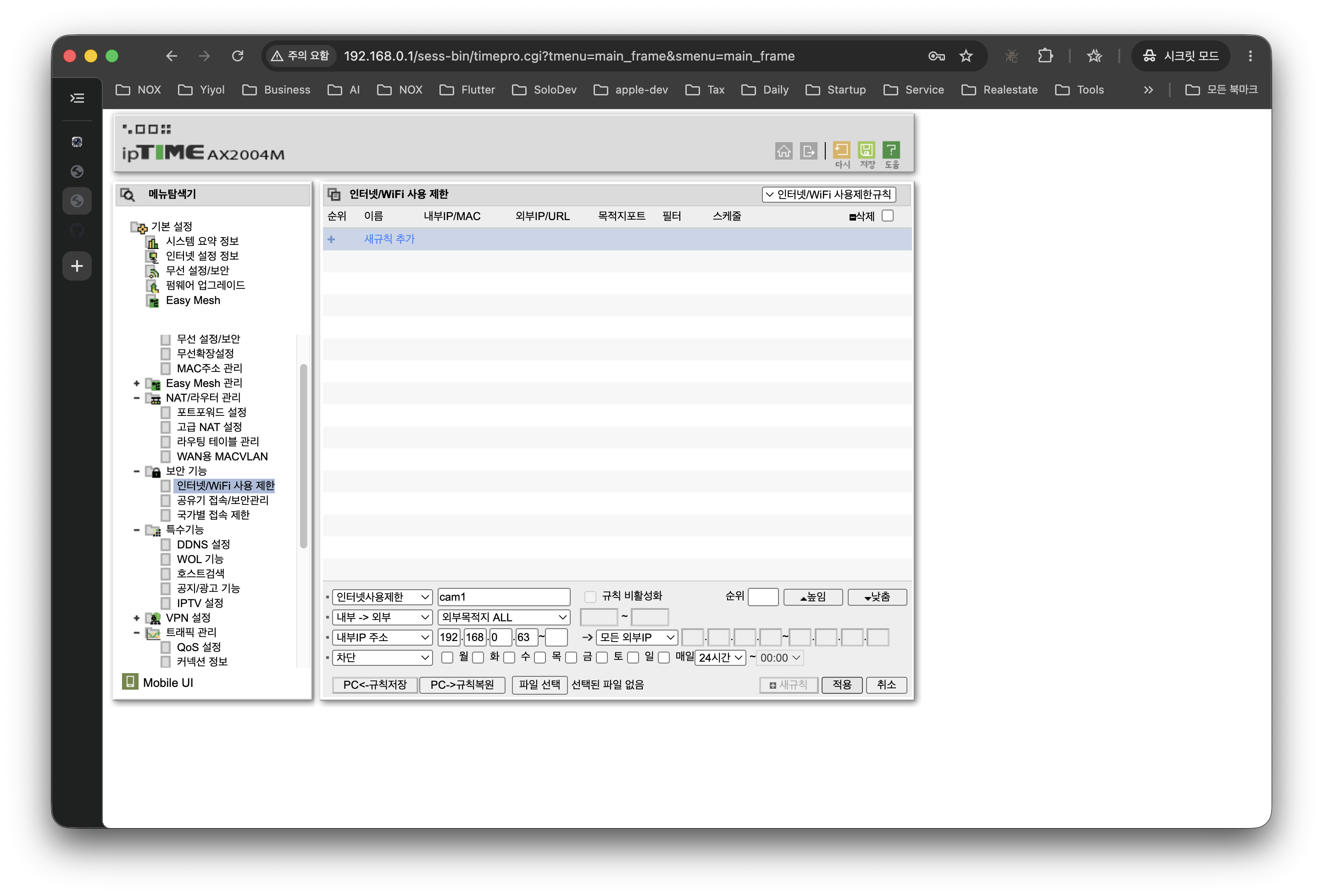
Go to Advanced Setup > Security > Internet/WiFi Access Restriction, select "User Advanced Settings" mode, and enter the following.
- Direction:
Internal → External - Rule name:
cam1-egress-block - Internal IP address:
192.168.0.63 - External destination:
ALL, all external IPs - Port: leave blank or
ALL - Action:
Block - Schedule:
Every day, 24 hours - Apply > Register as new rule
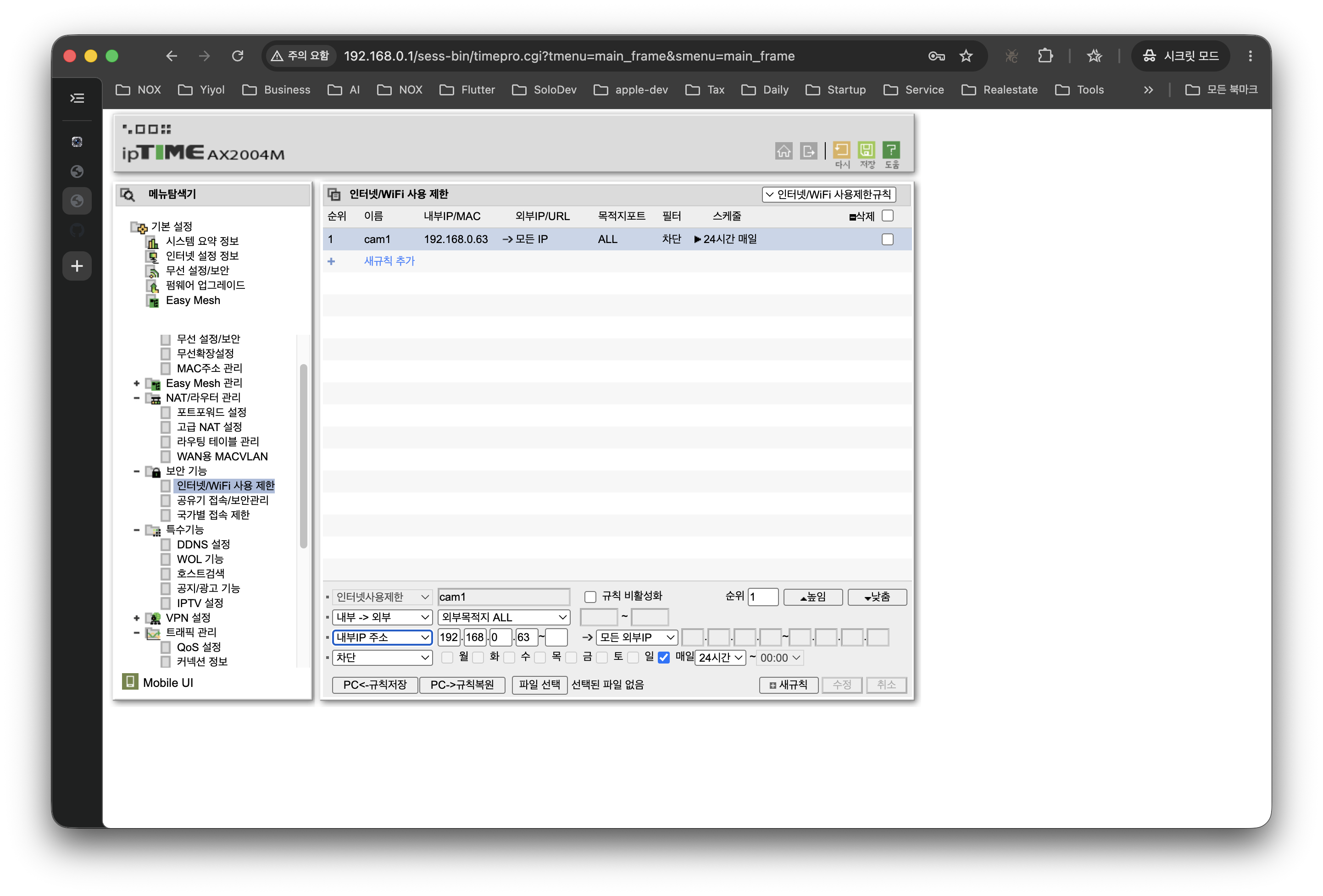
Once registered, a cam1 row appears in the list as active.
If you have several cameras, group them in a contiguous DHCP range such as 192.168.0.60~70 and register them in a single line as an IP range to keep things tidy.
3.3 Verifying the block
If the camera vendor's app (XMEye, Hik-Connect, etc.) shows the camera as "offline", the isolation is in effect.
4. Why egress blocking alone is not enough
At this point the path by which cameras send telemetry to servers in China is cut. Two holes remain, however.
First, lateral movement within the LAN. Egress blocking only stops outbound traffic; it does not stop other devices on the same LAN from connecting directly to the camera. If a family laptop gets infected, it can reach the camera's unprotected RTSP/ONVIF.
Second, viewing from outside. Port forwarding to each camera is the worst option. A single authentication-bypass CVE is enough to expose your video to the whole world (recall the 8,000-odd cameras on Shodan above).
The fix is an industry-standard pattern: route all camera access through a single VMS server, and expose only that one VMS to the outside, protected by TLS and strong authentication — the VMS security proxy architecture known as the Gateway NVR pattern.
5. Hands-on, part 2 — a network design with NOX VMS as the security proxy

The key flow in three lines:
- The eight cameras are confined inside the dashed box. The ipTime egress rule blocks all external traffic, so P2P cloud signals such as XMEye or Hik-Connect cannot get out.
- The NOX host becomes the only bridge. It talks to the cameras over RTSP/ONVIF inside the isolated network, and to users (PCs, NOX Mobile) over LAN/HTTPS.
- Only NOX is exposed externally. ipTime port forwarding is opened only to the NOX HTTPS port, and NOX takes care of authentication, TLS and logging. Not a single byte from the cameras is exposed to the internet.
6. Security benefits of this design (checklist)
- External callbacks blocked regardless of camera firmware — backdoors, telemetry and malicious firmware updates are all stopped.
- Single entry point → unified security — TLS, user permissions and access logs are controlled in one place: NOX.
- No external configuration changes when adding or replacing cameras — just attach them to the isolated network and register them in NOX.
- Simpler incident tracing — investigating suspicious traffic starts from a single place, the NOX access log.
- Prepared for supply-chain risk — given the regulatory trend in the UK and Korea, the fact that you "already isolated them" becomes a line of defense in future audits and inspections.
7. Frequently asked questions (FAQ) — practical Q&A on preventing IP camera hacking
Q1. I've only viewed the cameras through P2P apps (XMEye, Hik-Connect). Won't blocking make those apps unusable?
Yes. That is the intended result. The app working well meant the camera was connected bidirectionally to the vendor cloud at every moment, and this guide exists precisely to cut that connection. NOX VMS provides the same functions (remote viewing, alerts, recording) over a single authenticated, TLS-protected path.
Q2. Can I come in through a VPN instead of port forwarding?
That is the safer option. Connecting through ipTime's VPN server feature or WireGuard and reaching NOX as if on the LAN reduces the attack surface compared with port forwarding. Bear in mind, though, the operational burden of having every staff member install and maintain a VPN.
Q3. Does this work on routers other than ipTime?
The principle is the same. ASUS, Netgear, TP-Link and ISP-supplied routers all offer similar features under names like "Access Control" or "Outbound Firewall." Only the menu names differ; the behavior — "block outbound traffic from this internal IP" — is the same.
Q4. If RTSP/ONVIF is blocked, won't NOX also lose access to the cameras?
NOX communicates with the cameras from inside the isolated network. The ipTime egress rule blocks only the camera → external internet direction; NOX → camera traffic within the same LAN is unaffected.
8. Wrapping up — don't trust the camera, trust the network
The essence of Chinese IP camera security is not "which brand you buy" but that "the network decides what the camera can do externally." Firmware is always exposed to variables like missing patches, end-of-life and zero-days, but router rules are 100% under your control.
Today's to-do list is three lines long.
- Pin the camera's internal IP.
- Block that IP's external traffic with ipTime "Internet/WiFi Access Restriction" (= ipTime external IP blocking).
- If you need outside access, put a VMS such as NOX in place as the single entry point (VMS security proxy), and access the cameras only from inside.
NOX is one example of a tool that makes this pattern easy for ordinary users to follow. Whatever tool you use, the point is to make one line true today: "the camera never talks directly to the internet."
References
- 80% of IP cameras in Korea are Chinese-made… hacking concerns rise — Industry Journal (Korean)
- Waxing salons and room cafes with Chinese IP cams: mass footage leak to Chinese adult sites — Seoul Shinmun/Nate (Korean)
- Chinese hackers breach Korean IP cameras… 4,500 private videos exposed on Telegram — Boan News (Korean)
- Government moves to close IP cam security holes — ZDNet Korea (Korean)
- Measures to strengthen IP camera security — Korea Policy Briefing (Korean)
- Hikvision CVE-2021-36260: 100 million devices affected — IPVM
- Mirai-based Botnet Moobot Targets Hikvision Vulnerability — Fortinet
- 80,000 Hikvision cameras still vulnerable — The Register
- Millions Of Xiongmai Devices Hacked Via XMEye Cloud — SEC Consult
- CVE-2025-65856 Xiongmai XM530 ONVIF authentication bypass
- FCC Covered List
- UK Defines 'Sensitive Sites' Where PRC Cameras Are Banned — IPVM
- How to block internet and WiFi for a specific device on an ipTime router — itons.net (Korean)
- Blocking a specific IP with an ipTIME router — zipi (Korean)
- Home Network VLANs: Isolate IoT Devices for Security — State of Surveillance
- Gateway NVR — Video Experts Group
- VMS vs NVR — Genetec
- Thousands of unprotected security cameras spying — Cybernews
Related posts
- NVR/VMS NIS Security Requirements V3.0 Certification Guide — the security conformity verification process and key technical requirements mandatory for public-sector supply
- What is an Agentic AI NVR? The decisive difference from an AI NVR — from detection to autonomous action: how the LLM-based NOX NVR works