중국산 IP카메라 보안은 더 이상 미룰 수 없는 숙제가 되었다. 2024년 9월, 한국의 산부인과·왁싱숍·룸카페·펜션 수영장에 설치된 IP카메라 영상이 중국 음란 사이트와 텔레그램으로 유출됐다는 보도가 잇따랐다. 보안뉴스는 텔레그램에 노출된 한국 사생활 영상이 약 4,500개에 달한다고 단독 보도했고, 네이트뉴스는 같은 시기 중국 사이트에서 800개 이상 확인됐다고 전했다.
이 글은 카메라를 다 갈아치우라는 글이 아니다. 이미 설치된 IP카메라를 그대로 두면서, 오늘 30분으로 해킹 위험을 크게 낮추는 IP카메라 해킹 방지 실전 가이드다. 핵심은 두 가지—(1) ipTime 외부 IP 차단 기능으로 카메라 인터넷 접속을 끊고, (2) NOX VMS를 단일 진입점(보안 프록시)으로 두는 것이다.
1. 왜 "비밀번호만 바꾸면 안전"이 아닌가 — 중국산 IP카메라 보안의 본질
사고 보도는 보통 "초기 비밀번호 미변경"으로 결론난다. 하지만 국내 IP카메라의 약 80%가 중국산이고, 이 제품들은 출입문 외에 여러 옆문을 열어둔 채 출하되기 때문에 비밀번호만으로는 부족하다.
카메라가 인터넷으로 내보내는 트래픽은 크게 세 갈래다.
- P2P 클라우드 텔레메트리 — XMEye, Hik-Connect, Dahua P2P는 카메라 전원이 켜지자마자 제조사 클라우드로 항상-연결을 유지한다. XMEye는 모든 통신이 미암호화이며 펌웨어 업데이트마저 평문이라 중간자 공격에 취약하다. XMEye 위험성은 보안 업계가 수년째 경고해 온 사안이다.
- 펌웨어 백도어/RCE — Hikvision 백도어의 대표 사례인 CVE-2021-36260은 인증 없이 루트 권한을 가져가는 취약점으로, 영향 기기가 1억 대 이상이고 Moobot 봇넷이 적극 활용했다. 패치 1년 뒤에도 8만 대 이상이 미패치 상태였다. 최근엔 Xiongmai XM530의 CVE-2025-65856 (ONVIF 인증 우회, CVSS 9.8)이 보고됐다.
- ONVIF/RTSP 무방비 노출 — 포트포워딩 한 번이면 영상이 그대로 인터넷에 떠다닌다. Shodan에 무방비 RTSP 카메라 8,373대 이상이 노출된 상태다.
미국은 FCC Covered List로 신규 인증을 막았고, 영국은 민감 시설에서 단계 교체 중이며, 한국도 다중이용시설 인증 의무화를 추진한다. 정부 차원에서도 "그냥 두면 안 된다"는 결론에 도달한 셈이다.
2. 해결 원칙 — CCTV 네트워크 분리로 카메라를 외부 인터넷과 격리하라
IoT 보안 가이드의 공통 권고는 단순하다. 카메라는 별도 네트워크에 두고, 인터넷 outbound는 기본 차단(default deny)하라. 이것이 모범 사례로 자리잡은 CCTV 네트워크 분리의 핵심 원칙이다.
이상적인 구성은 카메라 전용 VLAN/SSID에 두고 방화벽에서 egress를 막은 뒤 필요한 NTP·DNS만 화이트리스트로 허용하는 것이다. 하지만 이건 UniFi·pfSense 같은 prosumer 장비가 필요하다. 다행히 ipTime의 "인터넷/WiFi 사용 제한" 은 본질적으로 egress 필터라, VLAN 없이도 "이 IP는 외부 인터넷으로 못 나간다"는 IP카메라 인터넷 차단 효과를 만들 수 있다.
3. 실전 1편 — ipTime 외부 IP 차단으로 카메라 인터넷 끊기
3.1 사전 준비: 카메라 내부 IP 고정
규칙은 내부 IP 기준이라 DHCP로 IP가 바뀌면 무력화된다. ipTime 관리자(http://192.168.0.1) > 고급 설정 > 네트워크 관리 > DHCP 서버 설정에서 카메라 MAC을 수동 등록으로 옮겨둔다. 예시는 192.168.0.63(cam1)로 진행한다.
3.2 메뉴 진입과 규칙 추가
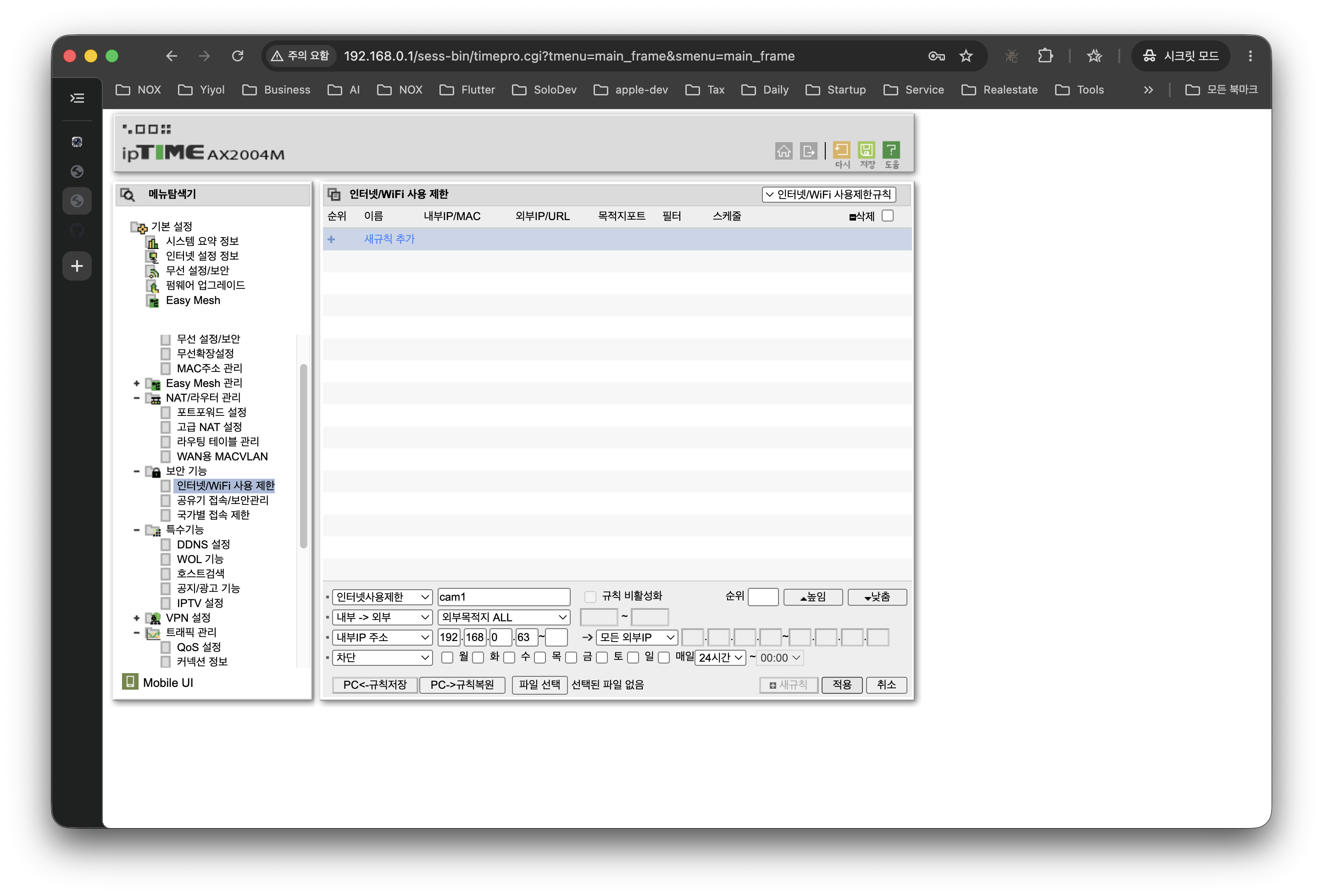
고급 설정 > 보안 기능 > 인터넷/WiFi 사용 제한으로 이동, "사용자 고급 설정" 모드를 선택하고 다음과 같이 입력한다.
- 방향:
내부 → 외부 - 규칙 이름:
cam1-egress-block - 내부 IP 주소:
192.168.0.63 - 외부 목적지:
ALL, 모든 외부 IP - 포트: 비워두기 또는
ALL - 동작:
차단 - 스케줄:
매일 24시간 - 적용 > 새규칙으로 등록
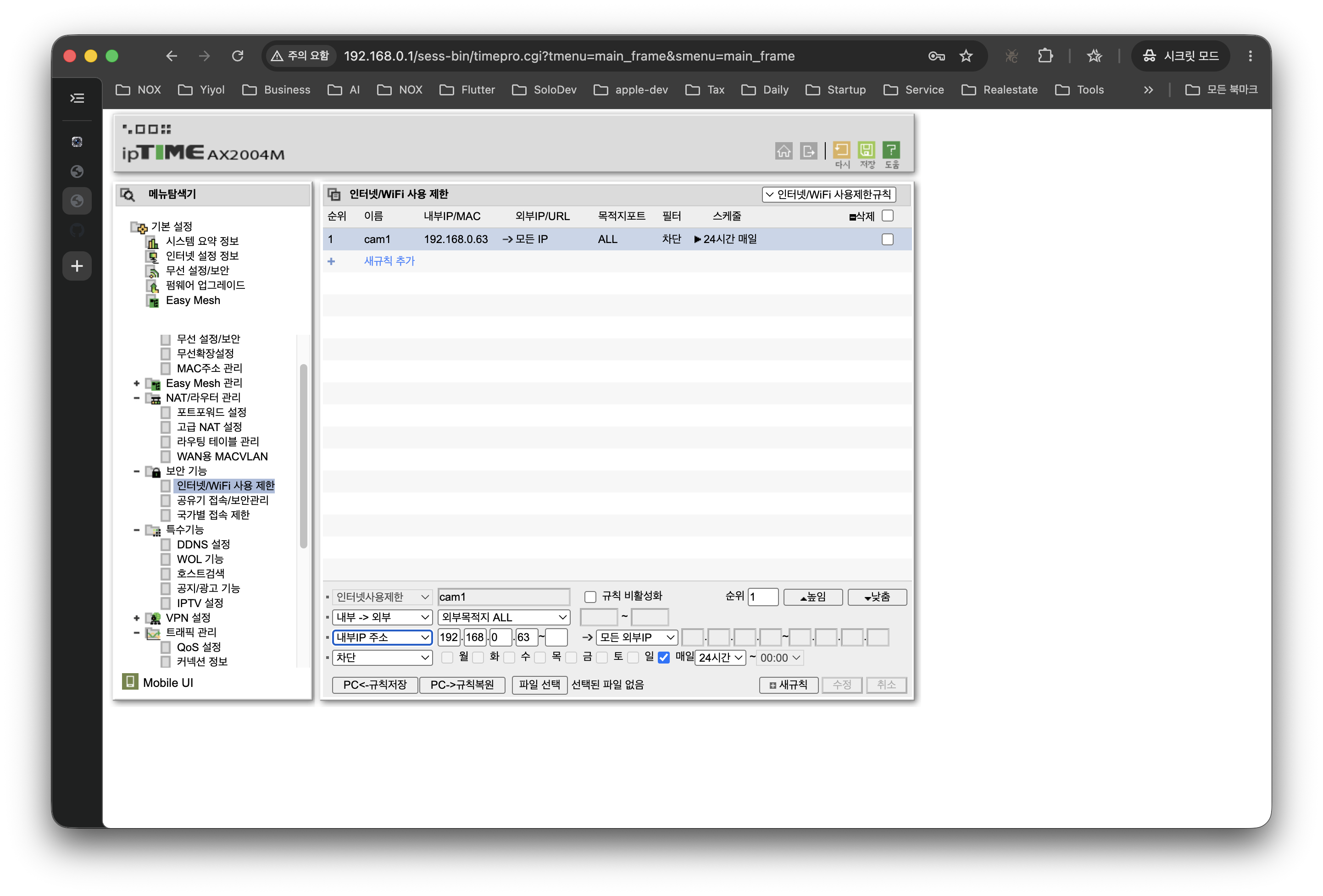
규칙이 등록되면 목록에 cam1 행이 활성 상태로 나타난다.
카메라가 여러 대라면 DHCP에서 192.168.0.60~70 같은 연속 대역에 몰아 넣고 IP 범위로 한 줄에 등록하면 깔끔하다.
3.3 차단 확인
카메라 제조사 앱(XMEye, Hik-Connect 등)에서 "오프라인"으로 뜨면 격리가 적용된 신호다.
4. egress 차단만으론 부족한 이유
여기까지만 해도 카메라가 중국 서버로 텔레메트리를 보내는 경로는 끊었다. 그러나 두 가지 구멍이 남는다.
첫째, LAN 내 측면 이동. egress 차단은 외부로의 통신만 막을 뿐, 같은 LAN의 다른 기기가 카메라에 직접 붙는 경로는 막지 않는다. 가족 노트북이 감염되면 카메라의 무방비 RTSP/ONVIF로 접근할 수 있다.
둘째, 외부에서 보고 싶을 때. 카메라마다 포트포워딩은 가장 나쁜 선택이다. 인증 우회 CVE 하나면 영상이 전 세계에 노출된다(앞서 본 Shodan 8,000여 대 사례).
해결은 산업계 표준 패턴이다. 모든 카메라 접근을 단일 VMS 서버를 통하게 하고, 외부 공개는 그 VMS 한 곳만, TLS와 강한 인증으로 묶는 것 — Gateway NVR 패턴으로 알려진 VMS 보안 프록시 아키텍처다.
5. 실전 2편 — NOX VMS를 보안 프록시로 두는 네트워크 구조

핵심 흐름 세 줄:
- 카메라 8대는 점선 박스 안에 갇혀 있게 된다. ipTime egress 규칙이 모든 외부 통신을 막아, XMEye·Hik-Connect 같은 P2P 클라우드 신호가 외부로 나갈 수 없다.
- NOX 호스트가 유일한 다리가 된다. 카메라와는 격리망 안에서 RTSP/ONVIF로, 사용자(PC·NOX Mobile)와는 LAN/HTTPS로 대화한다.
- 외부 공개는 NOX 한 곳만. ipTime 포트포워딩을 NOX HTTPS 포트로만 열고, 인증·TLS·로그를 NOX가 책임진다. 카메라는 인터넷에 한 바이트도 노출되지 않는다.
6. 이 구조가 주는 보안 이점 (체크리스트)
- 카메라 펌웨어가 어떻든 외부 콜백 차단 — 백도어·텔레메트리·악성 펌웨어 업데이트가 모두 막힌다.
- 단일 진입점 → 보안 일원화 — TLS·사용자 권한·접근 로그를 NOX 한 곳에서 통제한다.
- 카메라 추가·교체 시 외부 설정 변경 불필요 — 격리 네트워크에 붙이고 NOX에 등록만 하면 된다.
- 사고 시 추적 단순화 — 의심 트래픽 추적은 NOX 접근 로그 한 곳에서 시작한다.
- 공급망 리스크 대비 — 영국·한국의 규제 흐름에서 "이미 격리해 두었다"는 사실 자체가 향후 감사·점검에 방어선이 된다.
7. 자주 묻는 질문 (FAQ) — IP카메라 해킹 방지 실무 Q&A
Q1. P2P 앱(XMEye, Hik-Connect)으로만 봤는데, 차단하면 그 앱은 쓸 수 없게 되는 것 아닌가?
맞다. 그게 의도된 결과다. 앱이 잘 보였다는 건 카메라가 매 순간 제조사 클라우드와 양방향 연결돼 있었다는 뜻이고, 본 가이드는 정확히 그 연결을 끊기 위한 것이다. NOX VMS가 같은 역할(원격 보기·알림·녹화)을 단일 인증·TLS 경로로 제공한다.
Q2. 포트포워딩 대신 VPN으로 들어와도 되는가?
더 안전한 옵션이다. ipTime의 VPN 서버 기능이나 WireGuard로 들어와 NOX에 LAN처럼 붙는 방식은 포트포워딩보다 공격 표면이 줄어든다. 다만 직원들이 모두 VPN을 설치·관리해야 하는 운영 부담은 고려해야 한다.
Q3. ipTime 말고 다른 공유기에서도 되는가?
원리는 동일하다. ASUS·Netgear·TP-Link·통신사 공유기 모두 "Access Control" 또는 "Outbound Firewall" 같은 이름으로 비슷한 기능을 제공한다. 메뉴 명칭만 다를 뿐 "이 내부 IP의 외부 outbound를 차단"이라는 동작은 같다.
Q4. RTSP/ONVIF를 막으면 NOX도 카메라를 못 보는 것 아닌가?
NOX는 격리 네트워크 안쪽에서 카메라와 통신한다. ipTime egress 규칙은 카메라 → 외부 인터넷 방향만 막을 뿐, 같은 LAN 안의 NOX → 카메라 통신은 영향받지 않는다.
8. 마무리 — 카메라를 신뢰하지 말고, 네트워크를 신뢰하라
중국산 IP카메라 보안의 본질은 "어떤 브랜드를 사느냐"가 아니라 "카메라가 외부로 무엇을 할 수 있는지를 네트워크가 결정한다" 는 점이다. 펌웨어는 미패치·EOL·0-day 같은 변수에 늘 노출되지만, 라우터 규칙은 사용자가 100% 통제할 수 있다.
오늘 할 일은 세 줄이다.
- 카메라의 내부 IP를 고정한다.
- ipTime "인터넷/WiFi 사용 제한"으로 그 IP의 외부 통신을 차단한다(= ipTime 외부 IP 차단).
- 외부에서 봐야 한다면 NOX 같은 VMS를 단일 진입점(VMS 보안 프록시)으로 두고, 카메라는 내부에서만 접근한다.
NOX는 이 패턴을 일반 사용자가 따라할 수 있게 만든 도구의 한 예다. 어떤 도구를 쓰든 핵심은 "카메라가 인터넷과 직접 대화하지 않는다" 는 한 줄을 오늘 실현하는 것이다.
참고 자료
- 국내 IP카메라 80%가 중국산… 해킹 사고 우려↑ — 산업종합저널
- 중국산 IP캠 설치한 왁싱숍·룸카페, 中 음란사이트에 영상 대량 유출 — 서울신문/네이트
- 중국 해커, 국내 IP 카메라 해킹... 4,500개 사생활 영상 텔레그램 노출 — 보안뉴스
- 한 가정집 몰카 어디서 나오나 했더니… 정부, IP캠 보안 구멍 막기 — ZDNet Korea
- IP 카메라 보안 강화 방안 — 대한민국 정책브리핑
- Hikvision CVE-2021-36260: 1억 대 영향 — IPVM
- Mirai-based Botnet Moobot Targets Hikvision Vulnerability — Fortinet
- 80,000 Hikvision cameras still vulnerable — The Register
- Millions Of Xiongmai Devices Hacked Via XMEye Cloud — SEC Consult
- CVE-2025-65856 Xiongmai XM530 ONVIF 인증 우회
- FCC Covered List
- UK Defines 'Sensitive Sites' Where PRC Cameras Are Banned — IPVM
- ipTime 공유기 특정 기기 인터넷 및 와이파이 차단 방법 — 아이티온즈넷
- ipTIME 공유기를 이용한 특정 IP 차단 — zipi
- Home Network VLANs: Isolate IoT Devices for Security — State of Surveillance
- Gateway NVR — Video Experts Group
- VMS vs NVR — Genetec
- Thousands of unprotected security cameras spying — Cybernews
관련 글
- NVR/VMS 국정원 보안요구사항 V3.0 인증 가이드 — 공공기관 납품 시 필수인 보안적합성 검증 절차와 핵심 기술 요건
- Agentic AI NVR이란? AI NVR과의 결정적 차이 — 감지에서 자율 실행으로, LLM 기반 NOX NVR의 동작 원리
Securing Chinese-made IP cameras is no longer a task that can be postponed. In September 2024, a string of reports revealed that footage from IP cameras installed in Korean obstetrics clinics, waxing salons, room cafes and pension swimming pools had leaked to Chinese adult sites and Telegram. Boan News reported exclusively that some 4,500 private Korean videos had been exposed on Telegram, and Nate News reported around the same time that more than 800 were found on Chinese sites.
This post does not tell you to rip out all your cameras. It is a practical guide to preventing IP camera hacking that keeps your existing cameras in place and sharply reduces the risk in about 30 minutes today. There are two key steps: (1) cut the cameras off from the internet with ipTime's external IP blocking feature, and (2) put NOX VMS in front of them as the single entry point (a security proxy).
1. Why "just change the password" is not enough — the real issue with Chinese IP camera security
Incident reports usually conclude with "the default password was never changed." But roughly 80% of IP cameras in Korea are made in China, and these products ship with several side doors open in addition to the front door, so a password alone is not enough.
The traffic a camera sends to the internet falls into three broad categories.
- P2P cloud telemetry — XMEye, Hik-Connect and Dahua P2P keep an always-on connection to the vendor cloud from the moment the camera powers up. All XMEye communication is unencrypted, and even firmware updates travel in plaintext, leaving them open to man-in-the-middle attacks. The risks of XMEye have been flagged by the security industry for years.
- Firmware backdoors / RCE — CVE-2021-36260, the textbook Hikvision backdoor case, grants root without authentication, affects more than 100 million devices, and was actively exploited by the Moobot botnet. A year after the patch, more than 80,000 devices were still unpatched. More recently, CVE-2025-65856 (ONVIF authentication bypass, CVSS 9.8) was reported in the Xiongmai XM530.
- Unprotected ONVIF/RTSP exposure — a single port forward is all it takes for video to float freely on the internet. Shodan shows more than 8,373 unprotected RTSP cameras exposed.
The US has blocked new certifications through the FCC Covered List, the UK is phasing them out of sensitive sites, and Korea is moving toward mandatory certification for multi-use facilities. Governments, too, have concluded that "leaving them as they are is not an option."
2. The principle — isolate cameras from the internet through CCTV network separation
The common recommendation across IoT security guides is simple: put cameras on a separate network and block outbound internet traffic by default (default deny). This is the core principle of CCTV network separation, now an established best practice.
The ideal setup places cameras on a dedicated VLAN/SSID, blocks egress at the firewall, and whitelists only the NTP and DNS they need. That, however, requires prosumer gear such as UniFi or pfSense. Fortunately, ipTime's "Internet/WiFi Access Restriction" is essentially an egress filter, so even without VLANs you can achieve IP camera internet blocking — "this IP cannot reach the outside internet."
3. Hands-on, part 1 — cutting cameras off the internet with ipTime external IP blocking
3.1 Preparation: pin the camera's internal IP
The rule is keyed on the internal IP, so it stops working if DHCP changes the address. In the ipTime admin page (http://192.168.0.1) > Advanced Setup > Network > DHCP Server Settings, move the camera's MAC address to manual assignment. This example uses 192.168.0.63 (cam1).
3.2 Opening the menu and adding a rule
Go to Advanced Setup > Security > Internet/WiFi Access Restriction, select "User Advanced Settings" mode, and enter the following.
- Direction:
Internal → External - Rule name:
cam1-egress-block - Internal IP address:
192.168.0.63 - External destination:
ALL, all external IPs - Port: leave blank or
ALL - Action:
Block - Schedule:
Every day, 24 hours - Apply > Register as new rule
Once registered, a cam1 row appears in the list as active.
If you have several cameras, group them in a contiguous DHCP range such as 192.168.0.60~70 and register them in a single line as an IP range to keep things tidy.
3.3 Verifying the block
If the camera vendor's app (XMEye, Hik-Connect, etc.) shows the camera as "offline", the isolation is in effect.
4. Why egress blocking alone is not enough
At this point the path by which cameras send telemetry to servers in China is cut. Two holes remain, however.
First, lateral movement within the LAN. Egress blocking only stops outbound traffic; it does not stop other devices on the same LAN from connecting directly to the camera. If a family laptop gets infected, it can reach the camera's unprotected RTSP/ONVIF.
Second, viewing from outside. Port forwarding to each camera is the worst option. A single authentication-bypass CVE is enough to expose your video to the whole world (recall the 8,000-odd cameras on Shodan above).
The fix is an industry-standard pattern: route all camera access through a single VMS server, and expose only that one VMS to the outside, protected by TLS and strong authentication — the VMS security proxy architecture known as the Gateway NVR pattern.
5. Hands-on, part 2 — a network design with NOX VMS as the security proxy
The key flow in three lines:
- The eight cameras are confined inside the dashed box. The ipTime egress rule blocks all external traffic, so P2P cloud signals such as XMEye or Hik-Connect cannot get out.
- The NOX host becomes the only bridge. It talks to the cameras over RTSP/ONVIF inside the isolated network, and to users (PCs, NOX Mobile) over LAN/HTTPS.
- Only NOX is exposed externally. ipTime port forwarding is opened only to the NOX HTTPS port, and NOX takes care of authentication, TLS and logging. Not a single byte from the cameras is exposed to the internet.
6. Security benefits of this design (checklist)
- External callbacks blocked regardless of camera firmware — backdoors, telemetry and malicious firmware updates are all stopped.
- Single entry point → unified security — TLS, user permissions and access logs are controlled in one place: NOX.
- No external configuration changes when adding or replacing cameras — just attach them to the isolated network and register them in NOX.
- Simpler incident tracing — investigating suspicious traffic starts from a single place, the NOX access log.
- Prepared for supply-chain risk — given the regulatory trend in the UK and Korea, the fact that you "already isolated them" becomes a line of defense in future audits and inspections.
7. Frequently asked questions (FAQ) — practical Q&A on preventing IP camera hacking
Q1. I've only viewed the cameras through P2P apps (XMEye, Hik-Connect). Won't blocking make those apps unusable?
Yes. That is the intended result. The app working well meant the camera was connected bidirectionally to the vendor cloud at every moment, and this guide exists precisely to cut that connection. NOX VMS provides the same functions (remote viewing, alerts, recording) over a single authenticated, TLS-protected path.
Q2. Can I come in through a VPN instead of port forwarding?
That is the safer option. Connecting through ipTime's VPN server feature or WireGuard and reaching NOX as if on the LAN reduces the attack surface compared with port forwarding. Bear in mind, though, the operational burden of having every staff member install and maintain a VPN.
Q3. Does this work on routers other than ipTime?
The principle is the same. ASUS, Netgear, TP-Link and ISP-supplied routers all offer similar features under names like "Access Control" or "Outbound Firewall." Only the menu names differ; the behavior — "block outbound traffic from this internal IP" — is the same.
Q4. If RTSP/ONVIF is blocked, won't NOX also lose access to the cameras?
NOX communicates with the cameras from inside the isolated network. The ipTime egress rule blocks only the camera → external internet direction; NOX → camera traffic within the same LAN is unaffected.
8. Wrapping up — don't trust the camera, trust the network
The essence of Chinese IP camera security is not "which brand you buy" but that "the network decides what the camera can do externally." Firmware is always exposed to variables like missing patches, end-of-life and zero-days, but router rules are 100% under your control.
Today's to-do list is three lines long.
- Pin the camera's internal IP.
- Block that IP's external traffic with ipTime "Internet/WiFi Access Restriction" (= ipTime external IP blocking).
- If you need outside access, put a VMS such as NOX in place as the single entry point (VMS security proxy), and access the cameras only from inside.
NOX is one example of a tool that makes this pattern easy for ordinary users to follow. Whatever tool you use, the point is to make one line true today: "the camera never talks directly to the internet."
References
- 80% of IP cameras in Korea are Chinese-made… hacking concerns rise — Industry Journal (Korean)
- Waxing salons and room cafes with Chinese IP cams: mass footage leak to Chinese adult sites — Seoul Shinmun/Nate (Korean)
- Chinese hackers breach Korean IP cameras… 4,500 private videos exposed on Telegram — Boan News (Korean)
- Government moves to close IP cam security holes — ZDNet Korea (Korean)
- Measures to strengthen IP camera security — Korea Policy Briefing (Korean)
- Hikvision CVE-2021-36260: 100 million devices affected — IPVM
- Mirai-based Botnet Moobot Targets Hikvision Vulnerability — Fortinet
- 80,000 Hikvision cameras still vulnerable — The Register
- Millions Of Xiongmai Devices Hacked Via XMEye Cloud — SEC Consult
- CVE-2025-65856 Xiongmai XM530 ONVIF authentication bypass
- FCC Covered List
- UK Defines 'Sensitive Sites' Where PRC Cameras Are Banned — IPVM
- How to block internet and WiFi for a specific device on an ipTime router — itons.net (Korean)
- Blocking a specific IP with an ipTIME router — zipi (Korean)
- Home Network VLANs: Isolate IoT Devices for Security — State of Surveillance
- Gateway NVR — Video Experts Group
- VMS vs NVR — Genetec
- Thousands of unprotected security cameras spying — Cybernews
Related posts
- NVR/VMS NIS Security Requirements V3.0 Certification Guide — the security conformity verification process and key technical requirements mandatory for public-sector supply
- What is an Agentic AI NVR? The decisive difference from an AI NVR — from detection to autonomous action: how the LLM-based NOX NVR works