NVR failover is the feature that lets another device take over camera ingest and recording when the device that was recording stops. NOX built it as an n:1 structure, where a single standby device backs up multiple production devices (primaries).
We use the terms as the product and the industry use them. The standby assuming the role of a dead primary is takeover; returning things to their original state after the primary recovers is failback; and moving the video the standby recorded during the outage back into the primary's timeline is record-back.
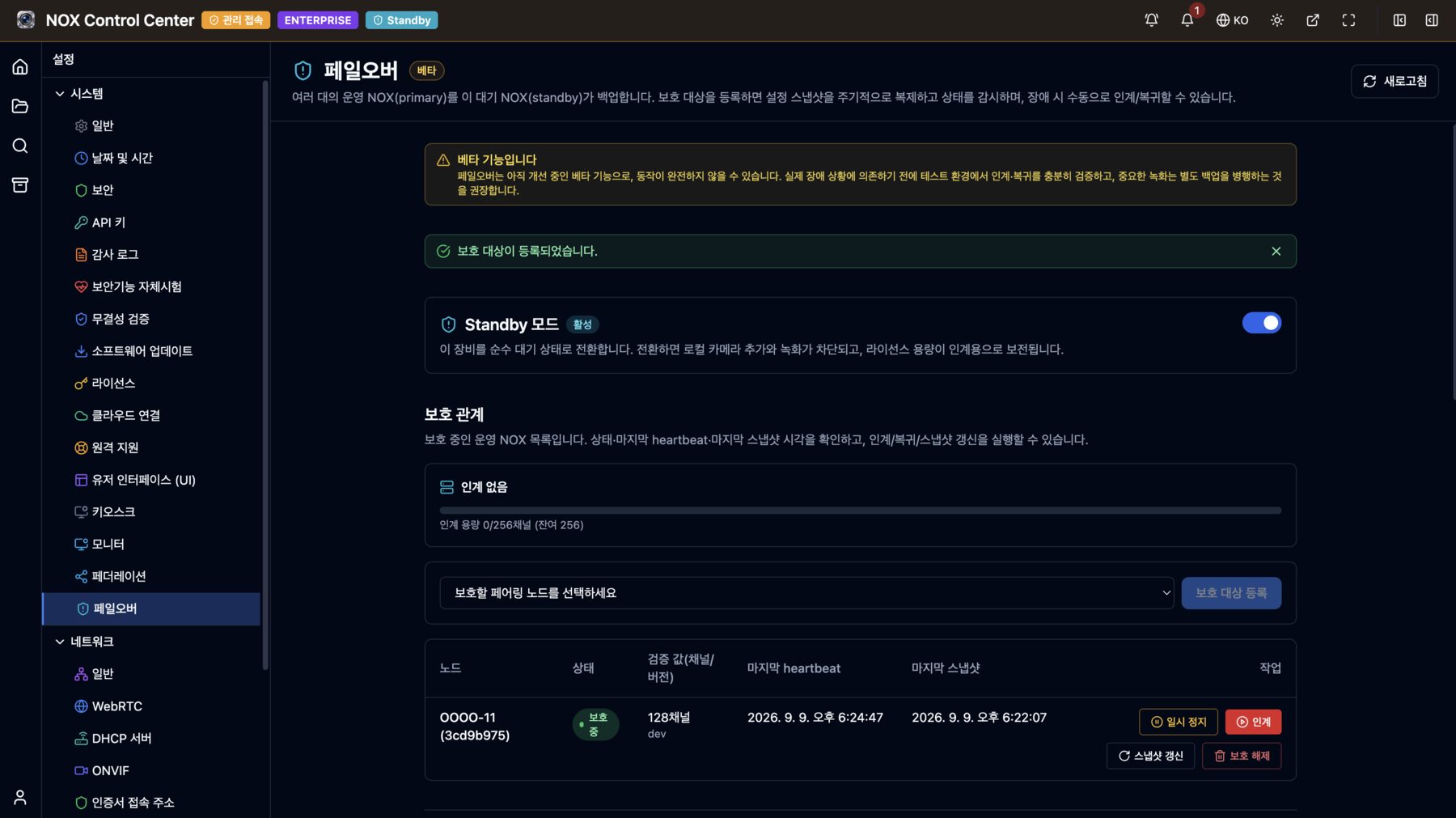
This post is not a feature introduction but a development log. It covers what we decided to guarantee, what broke during implementation, and what we have done so far to remove the Beta badge that is still on the screen. Everything here is based on the design documents and commit history in the repository, and on facts verified on devices actually running in the field.
Starting Point: Questions the Industry Has Already Answered
Before any design work, we read the official documentation of six commercial VMS and NVR products and built a comparison table item by item. Failover is a feature where customers always ask "how do other products do it?", and if we differ without a reason, we have to explain every difference.
| Product | Failure detection | Takeover time stated by the vendor | Handling of outage-period video |
|---|---|---|---|
| Milestone XProtect | Standby polls every 0.5 s; declared failed after 2 s without response | Cold standby 5 s + engine startup + camera connection | Automatic merge. The affected period cannot be viewed during the merge |
| Genetec Security Center | Managed by the central Directory | Within 60 s, recording gap up to 5 s | Copied after recovery, or redundant recording at all times |
| Nx Witness family | Server-to-server keep-alive | About 1 min (recording gap about 30 s) | Stays on the server that took over; not reclaimed |
| Hikvision N+1 | Spare monitors continuously (interval not disclosed) | Not disclosed | Automatic reclaim, limited to one device at a time |
| Dahua N+M | Slave and scheduler, 90–120 s to declare failure | 90–120 s | Reclaim supported, three-level transfer speed control |
| Exacq exacqVision | Central management server, "when recording stops" trigger | Configured timeout + α | Reclaimed at failback, with progress and pause |
Three things became clear from this.
First, replicating configuration in advance is the standard. Fetching configuration from a central management server at the moment of failure makes that server yet another single point of failure. Even Milestone supplements this approach with hot standby (pre-synchronization).
Second, every product accepts some recording loss between detection and takeover. The only way to get zero loss is to record on two devices at all times, and that is a different feature that doubles storage and bandwidth.
Third, virtual IP (IP takeover) is a minority approach. Of the six, only Dahua uses it, and in return it requires all devices to sit on the same L2 segment. All the others reconnect at the application level.
Goals: What We Committed to in Numbers
The survey showed failure detection ranging from 2 seconds (Milestone) to 120 seconds (Dahua), and takeover completion ranging from 15 to 60 seconds. We set NOX's goals in between.
| Item | Goal | Rationale |
|---|---|---|
| Failure detection | About 10 s (2 s heartbeat × 5 consecutive failures) | Well ahead of the appliance camp (90–120 s), while avoiding the 2 s range where false positives become likely |
| Takeover completion | Trigger → first segment within 30 s | On par with the enterprise VMS camp |
| Multiple simultaneous failures | Simultaneous takeover as far as licensed channel capacity allows | One step ahead of approaches that take over only one device (Hikvision, Milestone) |
| Outage-period video | Full record-back into the primary's timeline after failback | Without restricting viewing during the merge |
| Failback | Manual by default, automatic optional | Lets the operator control the additional interruption that occurs at the moment of failback |
Six Things We Settled First in the Design
1. The criterion is "is it recording?", not "is it alive?"
A ping response only tells you the device is powered on. A device whose disk has been pulled, whose partition is not mounted, or whose writes are failing answers ping just fine while storing nothing. So we added to the heartbeat response whether "there are streams to store right now, and are they actually being stored." A healthy idle state with no active recording does not count as a failure. Miss this distinction, and a brand-new device with no cameras registered is immediately declared failed.
2. No IP takeover
The standby does not inherit the dead device's address. Instead, it reconnects directly to the camera addresses contained in the snapshot. This is possible because NOX fetches camera video in a pure pull model (ONVIF/RTSP). Nothing on the camera side needs to change. There is one cost: the standby must be able to reach those cameras on the same network. We did not hide this condition; we surfaced it on screen. Right after takeover, the standby checks whether it can actually reach the target cameras, and raises a warning notification if any are unreachable. It is only a warning, though, and does not block takeover. Recording half the cameras is better than recording none.
3. The standby suspects its own network first
A structure in which the standby monitors directly carries a particular risk. If the primary is fine but only the standby's network is cut, the standby concludes "the primary is dead" and starts pulling video from the same cameras. So before declaring a failure, it first checks whether it can reach an arbitration IP (such as the default gateway). If it cannot reach the arbitration IP, it treats the problem as "on my side of the network" and defers the decision. On devices with multiple default gateways, it becomes ambiguous which one to use, so there is a setting to specify the arbitration IP directly, and a warning appears if it is left unset while multiple gateways are detected.
4. The camera service knows nothing about failover
Failover exists only inside the federation service. The camera service and the recording service do not know the concept of takeover at all; they just receive the usual requests to "register a camera and start recording." Keeping this boundary means that when something goes wrong in failover, it does not spread to the normal recording path.
Keeping this boundary did leave a gap, though. Blocking the addition of local cameras on a device switched to standby is filtered only in the UI. So we added two more layers of checks on the server. When a protected device is registered, spare capacity is calculated as "standby licensed channels − local recording channels" and registration is refused if it is insufficient; at actual takeover time, the channel count is recounted inside a transaction, and if it would be exceeded, the takeover is refused as a whole rather than performed partially. Blocking in the UI is only guidance; whether there is capacity is ultimately decided by the server.
5. Failback deactivates; it does not delete
If cameras that were taken over were deleted at failback, the outage-period video recorded from those cameras could disappear with them. So the interface called on the failback path has no delete method at all. Failback simply returns the cameras and recordings it took over to an inactive state. When the same device is taken over again later, the items left inactive are re-enabled, so no duplicate registrations occur. The actual deletion is done by a cleanup worker after all video remaining for that camera is gone.
6. Licenses are tied to hardware
NOX licenses are bound to the machine ID and product UUID and cannot be moved to another device. So the standby needs its own license, and its channel count must be at least that of the protected devices. Offering a free standby license was an option, but we did not do it. Instead, we made one standby able to take over multiple devices simultaneously as far as capacity allows, so one device's license can protect several devices. Overcommitted configurations, where the total registered channels exceed capacity, are also allowed. It is a legitimate way to operate that saves capacity on the premise that "not every primary will die at once." A warning is shown on the dashboard instead.
What Broke During Implementation
The design document was written on July 2, 2026, and the initial implementation, from the foundation layer through record-back, landed on July 3–4. The Beta badge went on July 8. The real work was not the four days between the initial implementation and the Beta badge, but the two and a half months after it.
Two devices could be taken over at once, and the tests hid it
The initial implementation put the condition "reject another takeover if one is already in progress" into a single UPDATE statement. Code review pointed out that this was vulnerable to write skew under PostgreSQL's default isolation level. If two different protection relationships were taken over at the same time, each statement would see its own independent snapshot, both would evaluate "no takeover in progress," and both could succeed.
Worse was the concurrency test that was supposed to verify this. The fake store used by the test was simulating atomicity with a mutex. Because everything was serialized within the process, real database contention was never reproduced, and the test always passed. The test that should have caught the defect was covering it up.
The fix was to enforce uniqueness at the database level with a partial unique index and to treat a duplicate-key error as a rejection. We also added a concurrency integration test that runs against a real database. The condition was later expanded from "one globally" to "as many as capacity allows," but checking the channel count in one step to prevent overruns stayed the same.
Takeover succeeded, but the recordings vanished from the screen
After takeover, the cameras were visible but all recording entries were missing. The cause was on the permissions side. Cameras and recordings are mapped to the default resource group when they are created, but only the takeover path did not call this mapping. Camera import calls it, and the normal recording creation path calls it too; it was missing only from the path that imports the configuration bundle for takeover.
As a result, the recording configuration was still in the database and the pipeline was working normally, but the permission filter removed everything, so the recordings disappeared only from the screen. The lesson was that exception paths like takeover must be checked separately to ensure they go through the same follow-up steps as the normal path, and we got caught in the same spot a few more times afterward.
Reboots were read as failures
The standby checks the primary's status every 2 seconds and treats 5 consecutive failures as a failure. That means entering maintenance mode, software updates, reboots, and shutdowns all look exactly like failures. In an environment with automatic takeover enabled, takeover would start 10 seconds after an administrator pressed the reboot button.
The solution is for the primary to notify the standby first when it begins planned work. Rather than building a new dedicated channel, we chose to carry the current planned work in the response to the heartbeat the standby sends. Reboot, shutdown, maintenance entry, and update requests wait up to 6–8 seconds for the standby to pick up this value before proceeding. That is why the reboot button responds a few seconds late on a protected device.
One more decision was needed here: when to lift the grace period. If it is cut off by time (say, 30 minutes), any work that does not recover within that time will trigger a false takeover again. So there is no time limit; the standby waits until the primary stabilizes as healthy, but if the planned work is finished and the primary still has not returned to a recording-capable state, monitoring is forcibly resumed after 10 minutes. This is so that the grace period does not cover up a defect. Conversely, if the grace period lasts more than 6 hours, a separate warning that "monitoring is off" is issued.
Record-back said "Completed" while throwing some away
The biggest defect came from the feature that moves video recorded by the standby during the outage into the primary's timeline after failback (record-back). On a real production device, we found that a considerable number of segments had hit a size cap and been silently discarded, yet the job that ended with failures outstanding carried a green "Completed" badge.
The cause had two layers. The transfer worker was loading each entire segment into memory before sending it, so the size cap set to protect memory had effectively become a threshold for discarding data. On top of that, the status assigned at the end of a job had no "partially failed" value, so jobs with outstanding failures were simply "Completed." Completed jobs have no retry button, so users could not even see a way to recover.
The fix went in three directions.
- We changed transfers to stream straight through without a memory buffer. The only reason for buffering, the constraint that "the hash must arrive before the data," was resolved by having the source side provide the hash in advance.
- The size cap is no longer a memory protection mechanism. The sender no longer discards data that exceeds it and only logs a warning; the real cap sits on the receiving side, which accepts data coming in from outside directly.
- We created a new "Completed with some errors" status. "Completed" was narrowed to mean "finished without missing anything," and jobs with outstanding failures get a warning badge and a retry button. Past jobs already recorded as completed were also re-evaluated retroactively. Otherwise, exactly the jobs that were affected would be the ones without a retry button.
Record-back video was deleted as soon as it arrived
The next defect was nastier. Video moved by record-back carries past timestamps from the outage period. If those timestamps already fall outside the primary's retention period, the primary's cleanup worker deletes them as soon as they arrive. When we actually checked, most of the segments acknowledged as successfully received had disappeared shortly afterward.
Moreover, when the last segment was deleted, the now-empty track and session were deleted in the same transaction, and if that landed in the middle of receive processing, it caused a foreign key violation and a 500 error. At first the 500 looked like the problem, but it was a symptom. The more dangerous part was that deleting the source after record-back is the default. Fixing only the error would open that path, leading to a state where "the transfer succeeded but the video exists on neither side." The 500 error had been acting as a defense by accident.
The fix was to add a way to ask the primary for the earliest timestamp that will survive if sent now (the later of the time computed from the retention period and the time of the oldest video actually remaining), and to skip older ranges before sending. We set one principle here: if that timestamp cannot be determined, nothing is skipped. Skipping is a choice to discard data, so it cannot be the default when we do not know. For the same reason, sessions that include ranges older than that timestamp do not have their source deleted. For ranges the primary will not accept, the standby holds the only copy.
Leftovers that no cleanup path caught
The worker that cleans up recordings received via takeover was running two paths, and both iterated by camera. So recording entries that came in without being linked to a camera slipped through both paths. With no camera, they were not caught by cascading deletes either, and the discard function deleted only sessions, leaving the recording rows untouched. The result was leftovers that no path would ever delete, and a user who found them piling up in the explorer of a production device raised the issue.
The fix was to create a third cleanup path that iterates by which device the data was taken over from, rather than by camera. However, normal data right after takeover looks exactly like these leftovers (no linked camera + takeover origin marker + no session), so excluding protection relationships currently in takeover from cleanup was the only way to tell them apart. We put the delete conditions directly inside the delete query instead of leaving them to the caller.
What We Have Done to Leave Beta
Fixing the defects above is the starting point. To remove the Beta badge, we needed not "it's fixed" but "if the same thing happens again, users can get out of it."
1. Build the escape hatches first. Record-back jobs can be paused, resumed, and retried. We also built a path to give up on record-back and discard the source recorded during takeover. Even when the license is locked, failback, removing protection, pausing record-back, and pausing monitoring are always allowed. The principle is that actions that revert or stop are never locked.
2. Report status honestly. Progress is shown separately as "amount of data moved" and "number of segments processed." Combining them into one produces displays like "Completed, but 69%." The same goes for live view switching. On takeover, the live source moves to the standby automatically, but it is not uninterrupted. It drops for a few seconds and then reconnects automatically. So the on-screen text reads "Automatic switch, reconnects within seconds," and a regression test prevents it from being mislabeled as "uninterrupted" or "seamless."
3. Distinguish planned work from failures. This is the automatic grace period described earlier. If the notification fails, a warning appears on the primary so the administrator can pause monitoring manually. When protection is removed or the connection is cut, a withdrawal notice is sent to the other device so that a "You are protected" message does not linger forever. Even if the notice fails, removal proceeds, and in that case the other device reveals it through a lost-monitoring-signal warning.
4. Split the permissions. Device-to-device communication permissions were separated into failover monitoring, status queries, and record-back. When the unified search screen queries takeover status, it receives only the status query permission, so it cannot access the configuration snapshot that contains camera credentials. Snapshots are always stored encrypted with AES-256-GCM, and if the encryption key is unavailable, registration and snapshots themselves are refused. Video moved by record-back travels still encrypted, without decryption, and only the session key is sealed once more in a public-key envelope during transit.
5. Make it traceable after the fact. Registration, removal, takeover, failback, and cleanup deletions are recorded in the audit log. Takeovers and failbacks executed automatically are recorded with system as the actor, distinguishing them from manual operations by an administrator. Periods when monitoring was paused, and who paused it, are recorded too. Whether a planned work notification reached the other device is also recorded in the details of the reboot and shutdown audit logs. If you cannot later check when monitoring was off, failover cannot become a feature you can trust.
6. Add tests. There are currently 61 Go test files with failover in their names, containing 587 test functions. These include the concurrency test that verifies against a real database the atomicity that was previously simulated with a mutex, authentication regression tests for the newly added destructive paths, and configuration sync tests for both deployment files. This feature added 14 database migrations, and half of them went in after the Beta badge was added.
The Stability This Has Bought
| Situation | Before failover | Now |
|---|---|---|
| Device power or hardware failure | All channels stop recording until recovery | Takeover after about 10 s of detection; recording resumes within the 30 s target |
| Disk or storage failure | The device is still alive, so nobody notices | Detected, because the "recording-capable state" is monitored |
| Outage-period video | Does not exist | Recorded on the standby, then merged into the primary's timeline via record-back after failback |
| Unified search and playback | That device's channels disappear entirely | Automatically rerouted to the standby after takeover is detected (target within 15 s) |
| Maintenance and updates | (Not applicable) | Automatic grace period via planned work notification; resumes automatically when done |
| Multiple simultaneous failures | (Not applicable) | Simultaneous takeover as far as capacity allows; if short, a notification is raised and takeover continues as capacity frees up |
Of these, the one felt most in the field is disk failure. At unstaffed sites, the most common incident is not a device shutting off but a device that stays on while not recording, for weeks. Ping-based monitoring cannot catch this.
We also list what we do not guarantee.
- Past video from a dead device cannot be shown in its place. Each device's recordings live only on its own local disk. The standby provides only the periods it recorded itself after takeover. Unless shared storage is used, this is a structural limitation common across the industry.
- There is a recording gap between detection and takeover. Leaving this period empty is something we accepted at the design stage. Bringing loss to zero would require redundant recording at all times, which is a different feature.
- Live view is not uninterrupted. It drops for a few seconds and then reconnects automatically.
- If the primary comes back on during takeover, both sides ingest the same cameras simultaneously. Availability comes first, so the primary does not automatically stop its own recording. Instead, a warning on the primary's screen shows that both sides are ingesting, prompting a failback.
- While paused, real failures are not detected. A manual pause is not lifted automatically.
- A single primary is not split up by channel and taken over in parts. It is taken over whole or refused.
Why the Beta Badge Is Still There
At the time of writing, the failover settings screen still shows the Beta badge and the persistent notice. The remaining condition is not a feature list but operating time.
The two most recent fixes, the issue where record-back video falling outside the retention period was deleted on arrival, and the leftovers that no path would delete, were made this month. Both were found on devices actually running in the field, not in code review. Until we have gone through enough real-world scenarios, such as repeated takeovers and failbacks, outages lasting more than a day and overlapping with the retention period, and another failure during record-back, it is safer to assume that more defects of the same kind remain.
Here is the criterion for removing the badge: when we have repeatedly confirmed at multiple sites that a full cycle from takeover through failback and record-back completes without administrator intervention, and the problems that come up along the way are not big enough to require a new status or a new cleanup path. The very fact that each of the last three fixes was only finished after creating a new status value, a new cleanup path, and a new query function is a sign that it is still too early.
Conclusion
The hard part of failover was not takeover. A path that decrypts the snapshot, registers cameras, and starts recording works within a few days. Where the time went was not taking over when we should not, not losing the data created after takeover, and making sure that when something fails, users know about it and can get out of it.
So the criterion for judgment came down to one thing. Whether failover is well built should be judged not by the takeover success rate, but by what is left when it fails. Is video that could not be recorded back still there? Is a failure ever shown as completed? Can periods when monitoring was off be checked afterward? The Beta badge comes off once we can answer "yes" to all of these questions.
👉 See the real operating screens on the NOX product page — failover settings and the system dashboard
NOX NVR partnership and POC program inquiries: yiyol.com/contact
Related Posts
- What Is a Headless NVR? Specs and Cost Structure of an NVR Without Monitor Output — Where the resources freed by removing local output go
- How to Isolate Chinese IP Cameras from the Internet and Use Them Safely with NOX — Placing cameras on an isolated network and the device-to-device connections that run on top of it
- NVR Disk Calculator — A calculator for sizing the standby device's storage