NVR 페일오버는 녹화 중이던 장비가 멈췄을 때 다른 장비가 그 카메라의 수집과 녹화를 이어받는 기능이다. NOX는 여러 대의 운영 장비(primary)를 한 대의 대기 장비(standby)가 백업하는 n:1 구조로 이 기능을 만들었다.
용어는 제품과 업계에서 쓰는 것을 그대로 쓴다. standby가 죽은 primary의 역할을 넘겨받는 것이 takeover, primary가 복구된 뒤 원래대로 되돌리는 것이 failback, 장애 기간에 standby가 녹화해 둔 영상을 primary 타임라인으로 되돌려 넣는 것이 record-back이다.
이 글은 기능 소개가 아니라 개발 기록이다. 무엇을 보장하기로 정했는지, 구현하면서 무엇이 깨졌는지, 그리고 아직 화면에 붙어 있는 베타 배지를 떼기 위해 무엇을 해왔는지를 정리한다. 본문에 적은 내용은 저장소의 설계 문서와 커밋 기록, 그리고 실제로 돌아가는 장비에서 확인한 사실에 근거한다.
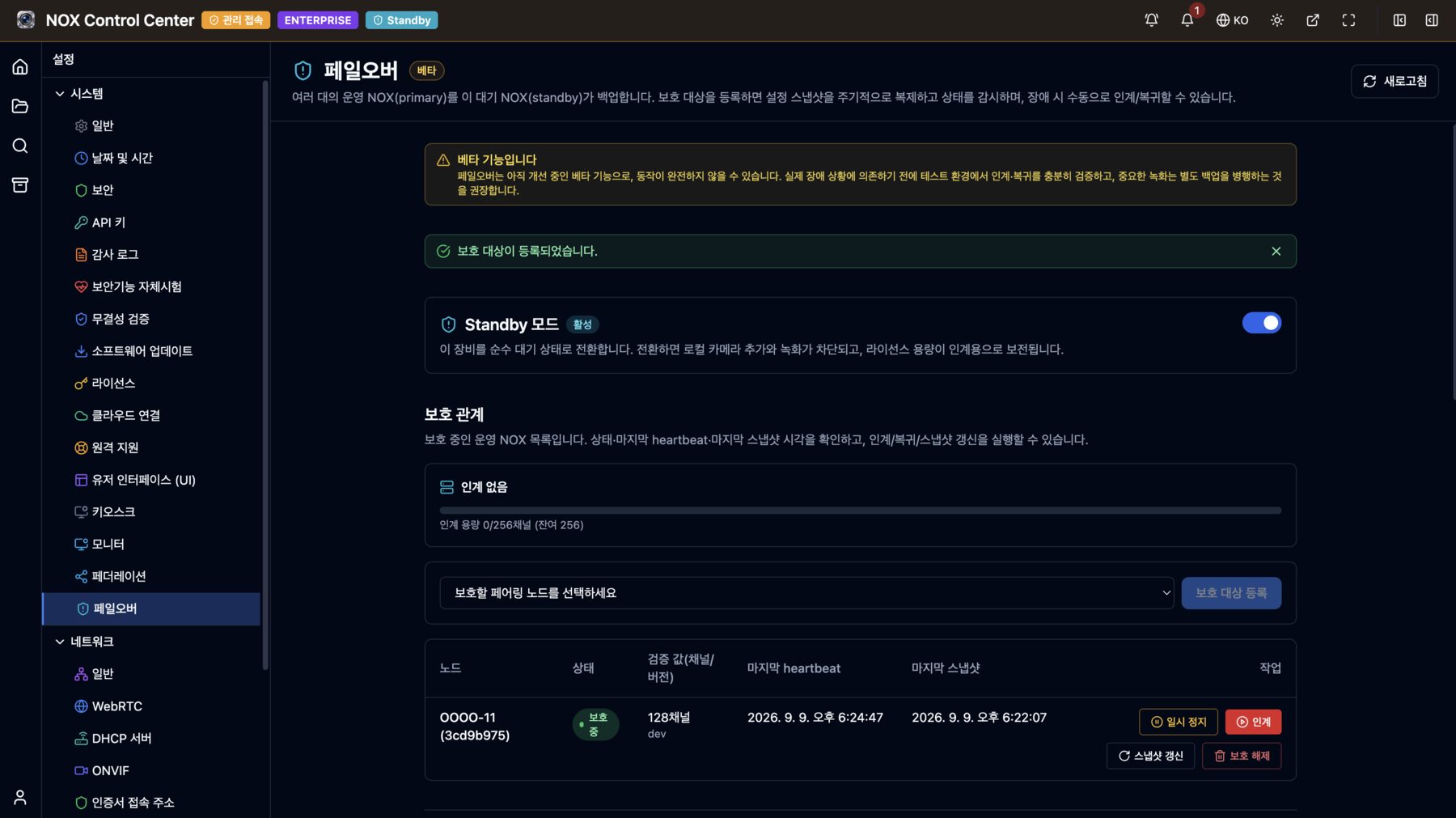
출발점: 업계가 이미 답을 정해 둔 항목들
설계보다 먼저 한 일은 상용 VMS·NVR 6종의 공식 문서를 읽고 항목별로 비교표를 만드는 것이었다. 페일오버는 고객이 "다른 제품은 어떻게 하느냐"고 반드시 묻는 기능이고, 근거 없이 다르게 만들면 그 차이를 전부 설명해야 한다.
| 제품 | 장애 감지 | 제조사가 밝힌 takeover 시간 | 장애 기간 영상 처리 |
|---|---|---|---|
| Milestone XProtect | standby가 0.5초 주기 폴링, 2초 무응답이면 판정 | cold standby 5초 + 엔진 기동 + 카메라 접속 | 자동 병합. 병합 중 해당 구간 열람 불가 |
| Genetec Security Center | 중앙 Directory가 관장 | 60초 이내, 녹화 공백 최대 5초 | 복구 후 복사, 또는 평소부터 이중 녹화 |
| Nx Witness 계열 | 서버 간 keep-alive | 약 1분(녹화 갭 약 30초) | 넘겨받은 서버에 그대로 남음, 회수 없음 |
| Hikvision N+1 | spare가 상시 감시(주기 미공개) | 미공개 | 자동 회수, 동시 1대 제한 |
| Dahua N+M | slave·스케줄러, 90~120초 판정 | 90~120초 | 회수 지원, 전송 속도 3단 제어 |
| Exacq exacqVision | 중앙 관리 서버, "녹화가 멈추면" 트리거 | 설정한 타임아웃 + α | failback 때 회수, 진행률·일시정지 제공 |
여기서 세 가지가 분명해졌다.
첫째, 설정은 미리 복제해 두는 것이 표준이다. 장애 시점에 중앙 관리 서버에서 설정을 받아 오는 방식은 그 관리 서버가 또 하나의 단일 장애점이 된다. Milestone조차 이 방식을 hot standby(사전 동기화)로 보완한다.
둘째, 감지에서 takeover까지의 녹화 유실은 모든 제품이 허용한다. 유실이 0인 방법은 평소부터 두 장비에 같이 녹화해 두는 것뿐이고, 그건 저장소와 대역폭을 두 배로 쓰는 다른 기능이다.
셋째, 가상 IP(IP takeover)는 비주류다. 6종 중 Dahua만 쓰고, 그 대가로 전 장비를 같은 L2 세그먼트에 두라는 제약을 받는다. 나머지는 전부 애플리케이션 레벨에서 재연결한다.
목표: 숫자로 확정한 것
조사해 보니 장애 판정은 2초(Milestone)에서 120초(Dahua)까지, takeover 완료는 15~60초에 걸쳐 있었다. NOX의 목표는 그 사이에 뒀다.
| 항목 | 목표 | 근거 |
|---|---|---|
| 장애 판정 | 약 10초 (heartbeat 2초 × 연속 실패 5회) | 어플라이언스 진영(90~120초)을 크게 앞서고, 오판 위험이 커지는 2초대는 피한다 |
| takeover 완료 | 트리거 → 첫 세그먼트 30초 이내 | 엔터프라이즈 VMS 진영과 동급 |
| 동시 다중 장애 | 라이선스 채널 용량이 허용하는 만큼 동시 takeover | 1대만 넘겨받는 방식(Hikvision·Milestone)보다 한 단계 앞선다 |
| 장애 기간 영상 | failback 후 primary 타임라인으로 전량 record-back | 병합 중 열람 제한 없이 |
| failback | 기본 수동, 자동은 선택 | failback 순간에 한 번 더 발생하는 단절을 운영자가 통제 |
설계에서 먼저 확정한 여섯 가지
1. 판정 기준은 "살아 있나"가 아니라 "녹화되고 있나"
ping 응답은 장비가 켜져 있다는 사실만 알려 준다. 디스크가 빠졌거나 파티션이 마운트되지 않았거나 쓰기가 실패하는 장비는 ping에 잘 응답하면서 아무것도 저장하지 않는다. 그래서 heartbeat 응답에 "지금 저장할 스트림이 있는데 실제로 저장되고 있는가"를 함께 실었다. 활성 녹화가 없는 정상 대기 상태는 장애로 치지 않는다. 이 구분을 놓치면 카메라를 한 대도 등록하지 않은 신품 장비가 즉시 장애로 판정된다.
2. IP takeover는 하지 않는다
standby는 죽은 장비의 주소를 물려받지 않는다. 대신 스냅샷에 들어 있는 카메라 주소로 직접 다시 연결한다. NOX가 카메라 영상을 가져오는 방식이 순수 pull(ONVIF/RTSP)이라 가능한 선택이다. 카메라 쪽 설정은 손대지 않아도 된다. 대가는 하나다. standby가 그 카메라들과 같은 네트워크에서 도달 가능해야 한다. 이 조건은 감추지 않고 화면에 드러냈다. takeover 직후 대상 카메라에 실제로 닿는지 점검해서, 닿지 않는 카메라가 있으면 경고 알림을 낸다. 다만 경고일 뿐 takeover를 막지는 않는다. 절반만 녹화되는 것이 하나도 녹화되지 않는 것보다 낫다.
3. standby는 자기 네트워크부터 의심한다
standby가 직접 감시하는 구조에는 특유의 위험이 있다. primary는 멀쩡한데 standby 쪽 네트워크만 끊긴 경우, standby는 "primary가 죽었다"고 판단하고 같은 카메라에 붙어 영상을 가져가기 시작한다. 그래서 장애라고 판단하기 전에 중재 IP(기본 게이트웨이 등)에 닿는지부터 확인한다. 중재 IP에 닿지 못하면 "내 쪽 네트워크 문제"로 보고 판단을 미룬다. 기본 게이트웨이가 여러 개인 장비에서는 어느 쪽을 기준으로 삼을지 애매해지므로, 중재 IP를 직접 지정하는 설정을 두고, 지정하지 않은 채 게이트웨이가 여러 개 잡히면 경고를 띄운다.
4. 카메라 서비스는 페일오버를 모른다
페일오버는 federation 서비스 안에만 존재한다. 카메라 서비스와 녹화 서비스는 takeover라는 개념 자체를 모르고, 평소와 똑같이 "카메라를 등록하고 녹화를 시작하라"는 요청을 받을 뿐이다. 이 경계를 지키면 페일오버에서 문제가 생겨도 평소 녹화 경로까지 번지지 않는다.
대신 이 경계를 지키느라 생긴 빈틈이 있다. standby로 전환한 장비에서 로컬 카메라 추가를 막는 일이 화면에서만 걸러진다. 그래서 서버 쪽에 확인 절차를 두 겹 더 뒀다. 보호 대상 등록 시점에 "standby 라이선스 채널 − 로컬 녹화 채널"로 여유 용량을 계산해 부족하면 등록을 거부하고, 실제 takeover 시점에는 트랜잭션 안에서 채널 수를 다시 세어 초과하면 일부만 takeover하지 않고 통째로 거부한다. 화면에서 막는 것은 안내일 뿐이고, 용량이 되는지는 결국 서버가 판단한다.
5. failback은 삭제가 아니라 비활성화
takeover했던 카메라를 failback 시점에 지우면, 그 카메라로 녹화한 장애 기간 영상이 함께 사라질 위험이 생긴다. 그래서 failback 경로에서 호출하는 인터페이스에는 삭제 메서드를 아예 만들지 않았다. failback은 넘겨받았던 카메라와 녹화를 비활성으로 돌려놓을 뿐이다. 같은 장비를 나중에 다시 takeover할 때는 비활성 상태로 남아 있던 항목을 다시 켜므로 중복 등록도 생기지 않는다. 실제로 지우는 일은 그 카메라에 남은 영상이 전부 없어진 뒤에 정리 워커가 한다.
6. 라이선스는 하드웨어에 묶여 있다
NOX 라이선스는 머신 ID와 제품 UUID에 결합돼 있어 다른 장비로 옮길 수 없다. 그래서 standby도 자기 라이선스가 필요하고, 그 채널 수가 보호 대상 이상이어야 한다. 무료 대기 라이선스를 두는 선택지도 있었지만 두지 않았다. 대신 한 대의 standby가 용량이 허용하는 한 여러 대를 동시에 takeover하도록 만들어서, 장비 한 대의 라이선스로 여러 대를 보호할 수 있게 했다. 등록 채널 합계가 용량을 넘는 오버커밋 구성도 허용한다. "모든 primary가 동시에 죽지는 않는다"는 전제로 용량을 아껴 쓰는 정상적인 운용이기 때문이다. 대신 대시보드에 경고를 띄운다.
구현하면서 깨진 것들
설계 문서를 쓴 날은 2026년 7월 2일, 기반 계층부터 record-back까지의 초기 구현을 올린 것이 7월 3~4일이다. 베타 배지를 붙인 날은 7월 8일이다. 초기 구현과 베타 배지 사이의 나흘이 아니라, 그 뒤로 두 달 반이 실제 작업이었다.
동시에 두 대를 takeover할 수 있었다. 그리고 테스트가 그걸 감췄다
초기 구현은 "이미 takeover 중이면 다른 takeover를 거부한다"는 조건을 UPDATE 문 하나에 담았다. 코드 리뷰에서 이것이 PostgreSQL 기본 격리 수준에서 write-skew에 취약하다는 지적이 나왔다. 서로 다른 두 보호 관계를 동시에 takeover하면 두 문장이 각각 독립 스냅샷을 보고 양쪽 모두 "takeover 중인 것 없음"으로 평가해 둘 다 성공할 수 있었다.
더 나쁜 것은 그걸 검증하기로 돼 있던 동시성 테스트였다. 테스트가 사용하는 가짜 저장소가 뮤텍스로 원자성을 흉내 내고 있었다. 프로세스 안에서 직렬화되므로 실제 데이터베이스 경쟁은 재현되지 않았고, 테스트는 언제나 통과했다. 결함을 막아야 할 테스트가 결함을 덮고 있었던 셈이다.
수정은 부분 유니크 인덱스로 데이터베이스 레벨에서 유일성을 강제하고, 중복 키 오류가 나면 거부된 것으로 처리하는 것이었다. 그리고 실제 데이터베이스에 붙는 동시성 통합 테스트를 추가했다. 이후 이 조건은 "전역 1건"에서 "용량이 허용하는 만큼"으로 확장됐지만, 채널 수를 한 번에 확인해 초과를 막는다는 점은 그대로 뒀다.
takeover는 성공했는데 화면에서 녹화만 사라졌다
takeover 후 카메라는 보이는데 녹화 항목이 전부 없어지는 현상이 있었다. 원인은 권한 쪽이었다. 카메라와 녹화는 생성될 때 기본 리소스 그룹에 매핑되는데, takeover 경로만 이 매핑을 부르지 않았다. 카메라 가져오기는 매핑을 호출하고 녹화의 정상 생성 경로도 호출하는데, takeover용 설정 묶음 가져오기 경로에서만 빠져 있었다.
결과적으로 녹화 설정은 데이터베이스에 그대로 있고 파이프라인도 정상 동작하는데, 권한 필터가 전부 걸러내서 화면에서만 사라지는 형태가 됐다. takeover 같은 예외 경로가 정상 경로와 똑같은 뒷처리를 거치는지 따로 확인해야 한다는 교훈이었고, 이후로도 같은 자리에서 몇 번 더 걸렸다.
재부팅을 장애로 읽었다
standby는 2초마다 primary의 상태를 확인하고 5회 연속 실패하면 장애로 본다. 그러면 유지보수 모드 진입, 소프트웨어 업데이트, 재부팅, 시스템 종료가 전부 장애와 똑같이 보인다. 자동 takeover를 켠 환경이라면 관리자가 재부팅 버튼을 누른 10초 뒤에 takeover가 시작된다.
해결은 primary가 계획된 작업을 시작할 때 standby에 먼저 알리는 것이다. 전용 통신로를 새로 만들지 않고, standby가 보내는 heartbeat의 응답에 현재 계획 작업을 실어 보내는 방식을 택했다. 재부팅·종료·유지보수 진입·업데이트 요청은 standby가 이 값을 받아갈 때까지 최대 6~8초 기다린 뒤 진행한다. 보호 중인 장비에서 재부팅 버튼 응답이 몇 초 늦어지는 이유가 이것이다.
여기서 결정이 하나 더 필요했다. 유예를 언제 풀 것인가. 시간으로 끊으면(예: 30분) 그 시간 안에 복구되지 않는 작업에서 잘못된 takeover가 다시 발생한다. 그래서 기간 제한을 두지 않고 primary가 정상으로 안정화될 때까지 기다리되, 계획 작업이 끝났는데도 녹화 가능 상태로 돌아오지 않으면 10분 뒤 감시를 강제로 재개한다. 결함을 유예로 덮지 않기 위해서다. 반대로 유예가 6시간 넘게 지속되면 "감시가 꺼져 있다"는 경고를 따로 발행한다.
record-back이 "완료"라고 말하면서 일부를 버렸다
장애 기간에 standby가 녹화한 영상을 failback 후 primary 타임라인으로 옮기는 기능(record-back)에서 가장 큰 결함이 나왔다. 실제 운영 장비에서 보니 적지 않은 세그먼트가 크기 상한에 걸려 조용히 버려졌는데, 실패가 남은 채 끝난 작업이 초록색 "완료" 배지를 달고 있었다.
원인은 두 겹이었다. 전송 워커가 세그먼트 전체를 메모리에 올린 뒤 보내고 있었고, 그 때문에 메모리를 지키려고 걸어 둔 크기 상한이 사실상 데이터를 버리는 기준선이 됐다. 게다가 작업이 끝날 때 붙는 상태에 "일부 실패"가 없어서, 실패가 남은 작업도 그냥 "완료"였다. 완료로 표시된 작업에는 재시도 버튼이 없으므로 사용자는 복구 수단조차 볼 수 없었다.
수정은 세 갈래였다.
- 전송을 메모리 버퍼 없이 스트림 그대로 흘려보내도록 바꿨다. 버퍼링의 유일한 이유였던 "해시가 데이터보다 먼저 와야 한다"는 제약은 원본 쪽이 해시를 미리 제공하는 것으로 풀었다.
- 크기 상한은 더 이상 메모리 보호 장치가 아니게 됐다. 보내는 쪽은 초과해도 버리지 않고 경고만 남기며, 진짜 상한은 밖에서 들어오는 데이터를 직접 받는 수신 측에 둔다.
- "일부 오류로 완료"라는 상태를 새로 만들었다. 완료는 "하나도 빠뜨리지 않고 끝났다"는 뜻으로 좁아졌고, 실패가 남은 작업에는 경고 배지와 재시도 버튼이 붙는다. 이미 완료로 기록돼 버린 과거 작업도 거슬러 올라가 상태를 다시 매겼다. 그러지 않으면 정작 피해를 본 작업만 재시도 버튼을 못 보게 된다.
record-back한 영상이 도착하자마자 지워졌다
그다음에 나온 결함이 더 고약했다. record-back으로 옮기는 영상은 장애 기간의 과거 시각을 가진다. 그 시각이 primary의 보관 기간을 이미 벗어났다면, primary의 정리 워커가 도착하는 족족 지운다. 실제로 확인해 보니 정상 수신했다고 응답한 세그먼트 대부분이 얼마 지나지 않아 사라져 있었다.
게다가 마지막 세그먼트가 지워질 때 빈 트랙과 세션까지 같은 트랜잭션에서 삭제되고, 그게 수신 처리 중간에 끼면 외래 키 위반으로 500 오류가 났다. 처음에는 이 500이 문제로 보였지만, 그건 증상이었다. 더 위험한 것은 record-back 후 원본 삭제가 기본값이라는 점이었다. 오류만 고치면 그 경로가 열려서 "전송에 성공했는데 양쪽 어디에도 없는" 상태가 된다. 500 오류가 우연히 방어 역할을 하고 있었던 것이다.
수정은 primary에게 지금 보내면 지워지지 않고 남는 가장 이른 시각(보관 기간으로 계산한 시각과 실제로 남아 있는 가장 오래된 영상의 시각 중 나중 쪽)을 물어보는 기능을 만들고, 그보다 오래된 구간은 보내기 전에 건너뛰는 것이었다. 여기서 원칙을 하나 정했다. 그 시각을 알아내지 못하면 건너뛰지 않는다. 건너뛰는 쪽이 데이터를 버리는 선택이라, 모를 때의 기본 동작이 될 수 없다. 같은 이유로, 그 시각보다 오래된 구간이 섞인 세션은 원본을 지우지 않는다. primary가 받아 주지 않는 구간은 standby가 유일한 사본이기 때문이다.
어떤 정리 경로에도 걸리지 않는 잔재
takeover로 받아 온 녹화를 정리하는 워커는 두 개의 경로를 돌고 있었는데, 둘 다 카메라를 기준으로 돌고 있었다. 그래서 카메라에 연결되지 않은 채로 들어온 녹화 항목은 두 경로를 모두 빠져나갔다. 카메라가 없으니 삭제 연쇄에도 걸리지 않았고, 폐기 기능도 세션만 지우고 녹화 행은 건드리지 않았다. 결과적으로 어떤 경로로도 지워지지 않는 잔재가 됐고, 한 운영 장비의 탐색기에 이 잔재가 쌓인 것을 사용자가 발견해 제기했다.
수정은 카메라가 아니라 어느 장비에서 넘겨받았는지를 기준으로 도는 세 번째 정리 경로를 만드는 것이었다. 다만 takeover 직후의 정상 데이터가 잔재와 모양이 똑같아서(카메라 미연결 + takeover 출처 표시 + 세션 없음), takeover 중인 보호 관계를 정리 대상에서 배제하는 것이 유일한 구분 수단이었다. 삭제 조건은 호출하는 쪽에 맡기지 않고 삭제 쿼리 안에 직접 넣었다.
베타를 떼기 위해 해온 일
위 결함들을 고친 것은 출발점이다. 베타 배지를 떼려면 "고쳤다"가 아니라 "다음에 같은 일이 생겨도 사용자가 빠져나올 수 있다"가 필요했다.
1. 탈출구를 먼저 만든다. record-back 작업은 일시정지·재개·재시도가 가능하다. record-back을 포기하고 넘겨받아 녹화한 원본을 폐기하는 경로도 만들었다. 라이선스가 잠긴 상태에서도 failback·보호 해제·record-back 일시정지·감시 일시정지는 항상 허용한다. 되돌리고 멈추는 동작은 잠그지 않는다는 원칙이다.
2. 상태를 정직하게 표기한다. 진행률을 "옮긴 데이터 양"과 "처리한 세그먼트 수"로 나눠 표시한다. 하나로 합치면 "완료인데 69%" 같은 표시가 나온다. 라이브 영상 전환도 마찬가지다. takeover 시 라이브 소스는 자동으로 standby로 옮겨 가지만 무중단은 아니다. 수 초 끊겼다가 자동 재연결된다. 그래서 화면 문구를 "자동 전환, 수 초 내 재연결"로 쓰고, "무중단"이나 "seamless"로 잘못 표기하지 못하도록 회귀 테스트를 걸어 뒀다.
3. 계획된 작업과 장애를 구분한다. 앞서 설명한 자동 유예다. 통지가 실패하면 primary 쪽에 경고를 띄워 관리자가 수동으로 정지할 수 있게 했다. 보호를 해제하거나 연결을 끊을 때는 상대 장비에 철회를 통지해서, "보호받고 있습니다"라는 안내가 영구히 남지 않게 했다. 통지가 실패해도 해제는 진행하되, 그 경우 상대 장비는 감시 신호 두절 경고로 그 사실을 드러낸다.
4. 권한을 쪼갠다. 장비 간 통신 권한을 페일오버 감시용, 상태 조회용, record-back용으로 분리했다. 통합 검색 화면이 takeover 상태를 조회할 때는 상태 조회 권한만 받으므로 카메라 자격증명이 들어 있는 설정 스냅샷에 접근할 수 없다. 스냅샷은 항상 AES-256-GCM으로 암호화해 저장하고, 암호화 키를 쓸 수 없는 상태에서는 등록과 스냅샷 자체를 거부한다. record-back으로 옮기는 영상은 복호화 없이 암호화된 상태 그대로 이동하며, 세션 키만 전송 구간에서 공개키 봉투로 한 번 더 봉인한다.
5. 사후에 추적할 수 있게 한다. 등록·해제·takeover·failback·정리 삭제가 감사 로그에 남는다. 자동으로 실행된 takeover와 failback은 수행 주체가 system으로 기록되어 관리자의 수동 조작과 구분된다. 감시를 일시 정지한 구간과 그 주체도 남는다. 계획 작업 통지가 상대에게 전달됐는지도 재부팅·종료 감사 로그 상세에 함께 기록한다. 감시가 꺼져 있던 시간을 나중에 확인할 수 없으면, 페일오버는 믿고 맡길 수 있는 기능이 되지 못한다.
6. 테스트를 붙인다. 현재 파일 이름에 failover가 들어간 Go 테스트 파일이 61개, 그 안의 테스트 함수가 587개다. 여기에는 앞서 뮤텍스로 흉내 냈던 원자성을 실제 데이터베이스에 붙어 검증하는 동시성 테스트, 새로 만든 파괴적 경로의 인증 회귀 테스트, 배포 파일 양쪽의 설정 동기화 테스트가 포함된다. 이 기능 때문에 추가한 데이터베이스 마이그레이션은 14건이고, 그중 절반이 베타 배지를 붙인 뒤에 들어갔다.
이걸로 확보한 안정성
| 상황 | 페일오버 이전 | 현재 |
|---|---|---|
| 장비 전원·하드웨어 고장 | 복구까지 전 채널 녹화 중단 | 약 10초 판정 후 takeover, 목표 30초 내 녹화 재개 |
| 디스크·스토리지 고장 | 장비는 살아 있어 아무도 모름 | "녹화 가능 상태"를 감시하므로 감지 대상 |
| 장애 기간 영상 | 존재하지 않음 | standby에 녹화 후 failback 뒤 record-back으로 primary 타임라인에 편입 |
| 통합 검색·재생 | 그 장비의 채널이 통째로 사라짐 | takeover 감지 후 standby로 자동 재라우팅(목표 15초 이내) |
| 유지보수·업데이트 | (해당 없음) | 계획 작업 통지로 자동 유예, 완료 후 자동 재개 |
| 동시 다중 장애 | (해당 없음) | 용량이 허용하는 만큼 동시 takeover, 모자라면 알림을 내고 용량이 생기면 이어서 takeover |
그중 현장에서 가장 체감되는 것은 디스크 장애다. 상주 인력이 없는 현장에서 가장 흔한 사고는 장비가 꺼지는 것이 아니라, 장비는 켜져 있는데 녹화가 되지 않는 상태로 몇 주가 지나가는 것이다. ping 기반 감시로는 이걸 잡지 못한다.
보장하지 않는 것도 같이 적어 둔다.
- 죽은 장비의 과거 영상은 대신 보여줄 수 없다. 각 장비의 녹화는 그 장비의 로컬 디스크에만 있다. standby는 takeover 이후 자신이 녹화한 구간만 제공한다. 공유 스토리지를 쓰지 않는 한 업계 공통의 구조적 한계다.
- 판정과 takeover 사이에 녹화 공백이 생긴다. 이 구간이 비는 것은 설계 단계에서 감수하기로 한 부분이다. 유실을 0으로 만들려면 평소부터 이중으로 녹화해야 하고, 그건 다른 기능이다.
- 라이브는 무중단이 아니다. 수 초 끊겼다가 자동 재연결된다.
- takeover 중 primary가 다시 켜지면 같은 카메라를 양쪽이 동시에 수집한다. 가용성을 우선해 primary가 자기 녹화를 자동으로 멈추지는 않는다. 대신 양쪽에서 수집 중이라는 사실을 primary 화면에 경고로 띄워 failback을 재촉한다.
- 일시 정지 중에는 실제 장애를 감지하지 못한다. 수동 정지는 자동으로 풀리지 않는다.
- 한 primary를 채널 단위로 쪼개 나눠서 takeover하지는 않는다. 통째로 takeover하거나 거부한다.
아직 베타 배지가 붙어 있는 이유
이 글을 쓰는 시점에도 페일오버 설정 화면에는 베타 배지와 상시 안내가 남아 있다. 남은 조건은 기능 목록이 아니라 운영 시간이다.
가장 늦게 고친 두 건, 즉 record-back한 영상이 보관 기간을 벗어나 있으면 도착하자마자 지워지던 문제와 어떤 경로로도 지워지지 않던 잔재는 이번 달에 수정했다. 둘 다 코드 리뷰가 아니라 실제로 돌아가는 장비에서 발견됐다. takeover와 failback을 여러 차례 반복하고, 장애가 하루를 넘겨 보관 기간과 겹치고, record-back 도중에 다시 장애가 나는 상황까지 실제 환경에서 충분히 겪어 보기 전까지는 같은 종류의 결함이 더 남아 있다고 보는 편이 안전하다.
배지를 떼는 기준은 이렇게 잡았다. takeover에서 failback, record-back까지 한 바퀴가 관리자 손을 타지 않고 끝나는 것을 여러 현장에서 거듭 확인하고, 그 과정에서 나오는 문제가 새로운 상태나 새로운 정리 경로를 만들어야 할 만큼 크지 않을 때. 최근 세 건의 수정이 각각 새로운 상태값, 새로운 정리 경로, 새로운 조회 기능을 만들고 나서야 끝났다는 사실 자체가 아직 이르다는 신호다.
결론
페일오버에서 어려운 부분은 takeover가 아니었다. 스냅샷을 복호화해 카메라를 등록하고 녹화를 시작하는 경로는 며칠이면 동작한다. 시간을 쓴 곳은 takeover하지 말아야 할 때 takeover하지 않는 것, takeover 이후에 만들어진 데이터를 잃지 않는 것, 그리고 무언가 실패했을 때 사용자가 그 사실을 알고 빠져나올 수 있게 하는 것이었다.
그래서 판단 기준도 하나로 정리됐다. 페일오버가 잘 만들어졌는지는 takeover 성공률이 아니라, 실패했을 때 무엇이 남아 있는지로 판단해야 한다. record-back하지 못한 영상이 남아 있는지, 실패가 완료로 표시되지는 않는지, 감시가 꺼져 있던 구간을 나중에 확인할 수 있는지다. 베타 배지는 그 질문들에 전부 "그렇다"고 답할 수 있게 된 뒤에 뗀다.
👉 NOX 제품 페이지에서 실제 운영 화면 확인 — 페일오버 설정과 시스템 대시보드
NOX NVR 파트너십 및 POC 프로그램 문의: yiyol.com/contact
관련 글
- 헤드리스 NVR이란? 모니터 출력을 걷어낸 NVR의 사양과 원가 구조 — 로컬 출력을 걷어내 확보한 자원을 어디에 쓰는지
- 중국산 IP카메라, 인터넷 차단으로 격리하고 NOX를 이용해서 안전하게 쓰는 법 — 카메라를 격리망에 두는 구성과 그 위에서 동작하는 장비 간 연결
- NVR 디스크 계산기 — 대기 장비의 저장 용량을 산정할 때 쓰는 계산기
NVR failover is the feature that lets another device take over camera ingest and recording when the device that was recording stops. NOX built it as an n:1 structure, where a single standby device backs up multiple production devices (primaries).
We use the terms as the product and the industry use them. The standby assuming the role of a dead primary is takeover; returning things to their original state after the primary recovers is failback; and moving the video the standby recorded during the outage back into the primary's timeline is record-back.
This post is not a feature introduction but a development log. It covers what we decided to guarantee, what broke during implementation, and what we have done so far to remove the Beta badge that is still on the screen. Everything here is based on the design documents and commit history in the repository, and on facts verified on devices actually running in the field.
Starting Point: Questions the Industry Has Already Answered
Before any design work, we read the official documentation of six commercial VMS and NVR products and built a comparison table item by item. Failover is a feature where customers always ask "how do other products do it?", and if we differ without a reason, we have to explain every difference.
| Product | Failure detection | Takeover time stated by the vendor | Handling of outage-period video |
|---|---|---|---|
| Milestone XProtect | Standby polls every 0.5 s; declared failed after 2 s without response | Cold standby 5 s + engine startup + camera connection | Automatic merge. The affected period cannot be viewed during the merge |
| Genetec Security Center | Managed by the central Directory | Within 60 s, recording gap up to 5 s | Copied after recovery, or redundant recording at all times |
| Nx Witness family | Server-to-server keep-alive | About 1 min (recording gap about 30 s) | Stays on the server that took over; not reclaimed |
| Hikvision N+1 | Spare monitors continuously (interval not disclosed) | Not disclosed | Automatic reclaim, limited to one device at a time |
| Dahua N+M | Slave and scheduler, 90–120 s to declare failure | 90–120 s | Reclaim supported, three-level transfer speed control |
| Exacq exacqVision | Central management server, "when recording stops" trigger | Configured timeout + α | Reclaimed at failback, with progress and pause |
Three things became clear from this.
First, replicating configuration in advance is the standard. Fetching configuration from a central management server at the moment of failure makes that server yet another single point of failure. Even Milestone supplements this approach with hot standby (pre-synchronization).
Second, every product accepts some recording loss between detection and takeover. The only way to get zero loss is to record on two devices at all times, and that is a different feature that doubles storage and bandwidth.
Third, virtual IP (IP takeover) is a minority approach. Of the six, only Dahua uses it, and in return it requires all devices to sit on the same L2 segment. All the others reconnect at the application level.
Goals: What We Committed to in Numbers
The survey showed failure detection ranging from 2 seconds (Milestone) to 120 seconds (Dahua), and takeover completion ranging from 15 to 60 seconds. We set NOX's goals in between.
| Item | Goal | Rationale |
|---|---|---|
| Failure detection | About 10 s (2 s heartbeat × 5 consecutive failures) | Well ahead of the appliance camp (90–120 s), while avoiding the 2 s range where false positives become likely |
| Takeover completion | Trigger → first segment within 30 s | On par with the enterprise VMS camp |
| Multiple simultaneous failures | Simultaneous takeover as far as licensed channel capacity allows | One step ahead of approaches that take over only one device (Hikvision, Milestone) |
| Outage-period video | Full record-back into the primary's timeline after failback | Without restricting viewing during the merge |
| Failback | Manual by default, automatic optional | Lets the operator control the additional interruption that occurs at the moment of failback |
Six Things We Settled First in the Design
1. The criterion is "is it recording?", not "is it alive?"
A ping response only tells you the device is powered on. A device whose disk has been pulled, whose partition is not mounted, or whose writes are failing answers ping just fine while storing nothing. So we added to the heartbeat response whether "there are streams to store right now, and are they actually being stored." A healthy idle state with no active recording does not count as a failure. Miss this distinction, and a brand-new device with no cameras registered is immediately declared failed.
2. No IP takeover
The standby does not inherit the dead device's address. Instead, it reconnects directly to the camera addresses contained in the snapshot. This is possible because NOX fetches camera video in a pure pull model (ONVIF/RTSP). Nothing on the camera side needs to change. There is one cost: the standby must be able to reach those cameras on the same network. We did not hide this condition; we surfaced it on screen. Right after takeover, the standby checks whether it can actually reach the target cameras, and raises a warning notification if any are unreachable. It is only a warning, though, and does not block takeover. Recording half the cameras is better than recording none.
3. The standby suspects its own network first
A structure in which the standby monitors directly carries a particular risk. If the primary is fine but only the standby's network is cut, the standby concludes "the primary is dead" and starts pulling video from the same cameras. So before declaring a failure, it first checks whether it can reach an arbitration IP (such as the default gateway). If it cannot reach the arbitration IP, it treats the problem as "on my side of the network" and defers the decision. On devices with multiple default gateways, it becomes ambiguous which one to use, so there is a setting to specify the arbitration IP directly, and a warning appears if it is left unset while multiple gateways are detected.
4. The camera service knows nothing about failover
Failover exists only inside the federation service. The camera service and the recording service do not know the concept of takeover at all; they just receive the usual requests to "register a camera and start recording." Keeping this boundary means that when something goes wrong in failover, it does not spread to the normal recording path.
Keeping this boundary did leave a gap, though. Blocking the addition of local cameras on a device switched to standby is filtered only in the UI. So we added two more layers of checks on the server. When a protected device is registered, spare capacity is calculated as "standby licensed channels − local recording channels" and registration is refused if it is insufficient; at actual takeover time, the channel count is recounted inside a transaction, and if it would be exceeded, the takeover is refused as a whole rather than performed partially. Blocking in the UI is only guidance; whether there is capacity is ultimately decided by the server.
5. Failback deactivates; it does not delete
If cameras that were taken over were deleted at failback, the outage-period video recorded from those cameras could disappear with them. So the interface called on the failback path has no delete method at all. Failback simply returns the cameras and recordings it took over to an inactive state. When the same device is taken over again later, the items left inactive are re-enabled, so no duplicate registrations occur. The actual deletion is done by a cleanup worker after all video remaining for that camera is gone.
6. Licenses are tied to hardware
NOX licenses are bound to the machine ID and product UUID and cannot be moved to another device. So the standby needs its own license, and its channel count must be at least that of the protected devices. Offering a free standby license was an option, but we did not do it. Instead, we made one standby able to take over multiple devices simultaneously as far as capacity allows, so one device's license can protect several devices. Overcommitted configurations, where the total registered channels exceed capacity, are also allowed. It is a legitimate way to operate that saves capacity on the premise that "not every primary will die at once." A warning is shown on the dashboard instead.
What Broke During Implementation
The design document was written on July 2, 2026, and the initial implementation, from the foundation layer through record-back, landed on July 3–4. The Beta badge went on July 8. The real work was not the four days between the initial implementation and the Beta badge, but the two and a half months after it.
Two devices could be taken over at once, and the tests hid it
The initial implementation put the condition "reject another takeover if one is already in progress" into a single UPDATE statement. Code review pointed out that this was vulnerable to write skew under PostgreSQL's default isolation level. If two different protection relationships were taken over at the same time, each statement would see its own independent snapshot, both would evaluate "no takeover in progress," and both could succeed.
Worse was the concurrency test that was supposed to verify this. The fake store used by the test was simulating atomicity with a mutex. Because everything was serialized within the process, real database contention was never reproduced, and the test always passed. The test that should have caught the defect was covering it up.
The fix was to enforce uniqueness at the database level with a partial unique index and to treat a duplicate-key error as a rejection. We also added a concurrency integration test that runs against a real database. The condition was later expanded from "one globally" to "as many as capacity allows," but checking the channel count in one step to prevent overruns stayed the same.
Takeover succeeded, but the recordings vanished from the screen
After takeover, the cameras were visible but all recording entries were missing. The cause was on the permissions side. Cameras and recordings are mapped to the default resource group when they are created, but only the takeover path did not call this mapping. Camera import calls it, and the normal recording creation path calls it too; it was missing only from the path that imports the configuration bundle for takeover.
As a result, the recording configuration was still in the database and the pipeline was working normally, but the permission filter removed everything, so the recordings disappeared only from the screen. The lesson was that exception paths like takeover must be checked separately to ensure they go through the same follow-up steps as the normal path, and we got caught in the same spot a few more times afterward.
Reboots were read as failures
The standby checks the primary's status every 2 seconds and treats 5 consecutive failures as a failure. That means entering maintenance mode, software updates, reboots, and shutdowns all look exactly like failures. In an environment with automatic takeover enabled, takeover would start 10 seconds after an administrator pressed the reboot button.
The solution is for the primary to notify the standby first when it begins planned work. Rather than building a new dedicated channel, we chose to carry the current planned work in the response to the heartbeat the standby sends. Reboot, shutdown, maintenance entry, and update requests wait up to 6–8 seconds for the standby to pick up this value before proceeding. That is why the reboot button responds a few seconds late on a protected device.
One more decision was needed here: when to lift the grace period. If it is cut off by time (say, 30 minutes), any work that does not recover within that time will trigger a false takeover again. So there is no time limit; the standby waits until the primary stabilizes as healthy, but if the planned work is finished and the primary still has not returned to a recording-capable state, monitoring is forcibly resumed after 10 minutes. This is so that the grace period does not cover up a defect. Conversely, if the grace period lasts more than 6 hours, a separate warning that "monitoring is off" is issued.
Record-back said "Completed" while throwing some away
The biggest defect came from the feature that moves video recorded by the standby during the outage into the primary's timeline after failback (record-back). On a real production device, we found that a considerable number of segments had hit a size cap and been silently discarded, yet the job that ended with failures outstanding carried a green "Completed" badge.
The cause had two layers. The transfer worker was loading each entire segment into memory before sending it, so the size cap set to protect memory had effectively become a threshold for discarding data. On top of that, the status assigned at the end of a job had no "partially failed" value, so jobs with outstanding failures were simply "Completed." Completed jobs have no retry button, so users could not even see a way to recover.
The fix went in three directions.
- We changed transfers to stream straight through without a memory buffer. The only reason for buffering, the constraint that "the hash must arrive before the data," was resolved by having the source side provide the hash in advance.
- The size cap is no longer a memory protection mechanism. The sender no longer discards data that exceeds it and only logs a warning; the real cap sits on the receiving side, which accepts data coming in from outside directly.
- We created a new "Completed with some errors" status. "Completed" was narrowed to mean "finished without missing anything," and jobs with outstanding failures get a warning badge and a retry button. Past jobs already recorded as completed were also re-evaluated retroactively. Otherwise, exactly the jobs that were affected would be the ones without a retry button.
Record-back video was deleted as soon as it arrived
The next defect was nastier. Video moved by record-back carries past timestamps from the outage period. If those timestamps already fall outside the primary's retention period, the primary's cleanup worker deletes them as soon as they arrive. When we actually checked, most of the segments acknowledged as successfully received had disappeared shortly afterward.
Moreover, when the last segment was deleted, the now-empty track and session were deleted in the same transaction, and if that landed in the middle of receive processing, it caused a foreign key violation and a 500 error. At first the 500 looked like the problem, but it was a symptom. The more dangerous part was that deleting the source after record-back is the default. Fixing only the error would open that path, leading to a state where "the transfer succeeded but the video exists on neither side." The 500 error had been acting as a defense by accident.
The fix was to add a way to ask the primary for the earliest timestamp that will survive if sent now (the later of the time computed from the retention period and the time of the oldest video actually remaining), and to skip older ranges before sending. We set one principle here: if that timestamp cannot be determined, nothing is skipped. Skipping is a choice to discard data, so it cannot be the default when we do not know. For the same reason, sessions that include ranges older than that timestamp do not have their source deleted. For ranges the primary will not accept, the standby holds the only copy.
Leftovers that no cleanup path caught
The worker that cleans up recordings received via takeover was running two paths, and both iterated by camera. So recording entries that came in without being linked to a camera slipped through both paths. With no camera, they were not caught by cascading deletes either, and the discard function deleted only sessions, leaving the recording rows untouched. The result was leftovers that no path would ever delete, and a user who found them piling up in the explorer of a production device raised the issue.
The fix was to create a third cleanup path that iterates by which device the data was taken over from, rather than by camera. However, normal data right after takeover looks exactly like these leftovers (no linked camera + takeover origin marker + no session), so excluding protection relationships currently in takeover from cleanup was the only way to tell them apart. We put the delete conditions directly inside the delete query instead of leaving them to the caller.
What We Have Done to Leave Beta
Fixing the defects above is the starting point. To remove the Beta badge, we needed not "it's fixed" but "if the same thing happens again, users can get out of it."
1. Build the escape hatches first. Record-back jobs can be paused, resumed, and retried. We also built a path to give up on record-back and discard the source recorded during takeover. Even when the license is locked, failback, removing protection, pausing record-back, and pausing monitoring are always allowed. The principle is that actions that revert or stop are never locked.
2. Report status honestly. Progress is shown separately as "amount of data moved" and "number of segments processed." Combining them into one produces displays like "Completed, but 69%." The same goes for live view switching. On takeover, the live source moves to the standby automatically, but it is not uninterrupted. It drops for a few seconds and then reconnects automatically. So the on-screen text reads "Automatic switch, reconnects within seconds," and a regression test prevents it from being mislabeled as "uninterrupted" or "seamless."
3. Distinguish planned work from failures. This is the automatic grace period described earlier. If the notification fails, a warning appears on the primary so the administrator can pause monitoring manually. When protection is removed or the connection is cut, a withdrawal notice is sent to the other device so that a "You are protected" message does not linger forever. Even if the notice fails, removal proceeds, and in that case the other device reveals it through a lost-monitoring-signal warning.
4. Split the permissions. Device-to-device communication permissions were separated into failover monitoring, status queries, and record-back. When the unified search screen queries takeover status, it receives only the status query permission, so it cannot access the configuration snapshot that contains camera credentials. Snapshots are always stored encrypted with AES-256-GCM, and if the encryption key is unavailable, registration and snapshots themselves are refused. Video moved by record-back travels still encrypted, without decryption, and only the session key is sealed once more in a public-key envelope during transit.
5. Make it traceable after the fact. Registration, removal, takeover, failback, and cleanup deletions are recorded in the audit log. Takeovers and failbacks executed automatically are recorded with system as the actor, distinguishing them from manual operations by an administrator. Periods when monitoring was paused, and who paused it, are recorded too. Whether a planned work notification reached the other device is also recorded in the details of the reboot and shutdown audit logs. If you cannot later check when monitoring was off, failover cannot become a feature you can trust.
6. Add tests. There are currently 61 Go test files with failover in their names, containing 587 test functions. These include the concurrency test that verifies against a real database the atomicity that was previously simulated with a mutex, authentication regression tests for the newly added destructive paths, and configuration sync tests for both deployment files. This feature added 14 database migrations, and half of them went in after the Beta badge was added.
The Stability This Has Bought
| Situation | Before failover | Now |
|---|---|---|
| Device power or hardware failure | All channels stop recording until recovery | Takeover after about 10 s of detection; recording resumes within the 30 s target |
| Disk or storage failure | The device is still alive, so nobody notices | Detected, because the "recording-capable state" is monitored |
| Outage-period video | Does not exist | Recorded on the standby, then merged into the primary's timeline via record-back after failback |
| Unified search and playback | That device's channels disappear entirely | Automatically rerouted to the standby after takeover is detected (target within 15 s) |
| Maintenance and updates | (Not applicable) | Automatic grace period via planned work notification; resumes automatically when done |
| Multiple simultaneous failures | (Not applicable) | Simultaneous takeover as far as capacity allows; if short, a notification is raised and takeover continues as capacity frees up |
Of these, the one felt most in the field is disk failure. At unstaffed sites, the most common incident is not a device shutting off but a device that stays on while not recording, for weeks. Ping-based monitoring cannot catch this.
We also list what we do not guarantee.
- Past video from a dead device cannot be shown in its place. Each device's recordings live only on its own local disk. The standby provides only the periods it recorded itself after takeover. Unless shared storage is used, this is a structural limitation common across the industry.
- There is a recording gap between detection and takeover. Leaving this period empty is something we accepted at the design stage. Bringing loss to zero would require redundant recording at all times, which is a different feature.
- Live view is not uninterrupted. It drops for a few seconds and then reconnects automatically.
- If the primary comes back on during takeover, both sides ingest the same cameras simultaneously. Availability comes first, so the primary does not automatically stop its own recording. Instead, a warning on the primary's screen shows that both sides are ingesting, prompting a failback.
- While paused, real failures are not detected. A manual pause is not lifted automatically.
- A single primary is not split up by channel and taken over in parts. It is taken over whole or refused.
Why the Beta Badge Is Still There
At the time of writing, the failover settings screen still shows the Beta badge and the persistent notice. The remaining condition is not a feature list but operating time.
The two most recent fixes, the issue where record-back video falling outside the retention period was deleted on arrival, and the leftovers that no path would delete, were made this month. Both were found on devices actually running in the field, not in code review. Until we have gone through enough real-world scenarios, such as repeated takeovers and failbacks, outages lasting more than a day and overlapping with the retention period, and another failure during record-back, it is safer to assume that more defects of the same kind remain.
Here is the criterion for removing the badge: when we have repeatedly confirmed at multiple sites that a full cycle from takeover through failback and record-back completes without administrator intervention, and the problems that come up along the way are not big enough to require a new status or a new cleanup path. The very fact that each of the last three fixes was only finished after creating a new status value, a new cleanup path, and a new query function is a sign that it is still too early.
Conclusion
The hard part of failover was not takeover. A path that decrypts the snapshot, registers cameras, and starts recording works within a few days. Where the time went was not taking over when we should not, not losing the data created after takeover, and making sure that when something fails, users know about it and can get out of it.
So the criterion for judgment came down to one thing. Whether failover is well built should be judged not by the takeover success rate, but by what is left when it fails. Is video that could not be recorded back still there? Is a failure ever shown as completed? Can periods when monitoring was off be checked afterward? The Beta badge comes off once we can answer "yes" to all of these questions.
👉 See the real operating screens on the NOX product page — failover settings and the system dashboard
NOX NVR partnership and POC program inquiries: yiyol.com/contact
Related Posts
- What Is a Headless NVR? Specs and Cost Structure of an NVR Without Monitor Output — Where the resources freed by removing local output go
- How to Isolate Chinese IP Cameras from the Internet and Use Them Safely with NOX — Placing cameras on an isolated network and the device-to-device connections that run on top of it
- NVR Disk Calculator — A calculator for sizing the standby device's storage